

In This Blog
- TL/DR
- Introduction
- What is Copilot Studio
- What is Azure AI Foundry
- Where Should You Start
- How I Decide Which to Use
- My Rule of Thumb
- Key Takeaways for Technology Leaders
- Final Thoughts
- FAQs
Introduction
When clients ask me about building AI agents, one of their first questions is often: Which Microsoft tool should I use? Copilot Studio or Azure AI Foundry? On the surface, they look similar. Both integrate deeply with the Microsoft ecosystem. Both can power custom agents. But in practice, they’re designed for very different use cases.
In this blog, I’ll explain how I approach the choice, where each tool shines, and why starting simple often creates the best long-term path.
What Copilot Studio Is, and Where It Shines
Copilot Studio is part of Microsoft’s Power Platform, and it’s what I would call a low-code agent-building environment. It’s designed for speed, accessibility, and rapid iteration. Here are some Copilot Studio highlights:
- It’s a low-code platform, so you don’t need to be a professional developer. Business subject matter experts can often manage and maintain the agents themselves.
- It connects to hundreds of systems through the Power Platform’s connector framework, giving you fast access to business data.
- It integrates directly with Microsoft 365, making it easy to extend Copilot and Teams experiences.
- It’s quicker to implement and often comes with cost savings when compared to Azure AI Foundry.
- It’s excellent for knowledge bases under about 500 documents. This is the sweet spot where performance is strong and management is straightforward.
I’ve seen Copilot Studio work beautifully in departmental use cases. For example, we built an IT helpdesk agent powered by around 300 knowledge articles. It was fast to deploy, easy to update, and delivered immediate value by deflecting common support tickets.
In short, Copilot Studio is a great choice when you need something working quickly, want to minimize development costs, and don’t have thousands of documents to manage.
What Azure AI Foundry Is, and Where It Excels
Azure AI Foundry, by contrast, is Microsoft’s pro-code, enterprise-grade AI platform. It’s designed for organizations that need scale, advanced customization, or more complex governance.
- It requires developers working in Python, C#, JavaScript, or TypeScript, often using Microsoft SDKs and APIs.
- It provides access to enterprise AI services like Azure AI Search, the Microsoft 365 Agents SDK, and a broader set of deployment options.
- It gives you flexibility to use large language models beyond GPT-4, including custom fine-tuned models. This makes it more suited for complex and special cases.
- It’s built for large-scale knowledge bases (thousands of documents) and scenarios where compliance and IT oversight are non-negotiable.
- One project I worked on involved a vehicle manufacturer with several thousand technical manuals. Copilot Studio simply wasn’t a fit at that scale. Azure AI Foundry allowed us to build an agent that could handle the volume, integrate securely with their Azure environment, and scale as their content grew.
If Copilot Studio is about speed, Foundry is about power and scalability.
How To Decide Which to Use
Here’s the way I frame the choice:
Use Copilot Studio if you…
- Need a working agent quickly.
- Have a knowledge base under 500 documents.
- Want business SMEs to manage the solution without heavy IT involvement.
- Need simple integrations with Power Platform, Dataverse, and Microsoft 365.
- Value speed, cost-effectiveness, and rapid iteration.
Use Azure AI Foundry if you…
- Need an enterprise-grade, IT-managed solution.
- Are working with large or complex knowledge bases (500+ documents).
- Require non-Microsoft LLMs or fine-tuned custom models.
- Need advanced logic or multi-channel deployment beyond Teams and M365.
- Must meet strict compliance, governance, or security requirements.
To put it another way: almost any agent you can build in Copilot Studio can also be built in Azure AI Foundry, but not the reverse. Foundry is the superset.
The Decision Tree in Microsoft’s Framework
Microsoft often presents a decision tree to help organizations decide between Copilot Studio and Azure AI Foundry. You may have seen this graphic in presentations such as Microsoft’s Copilot Developer Camp.
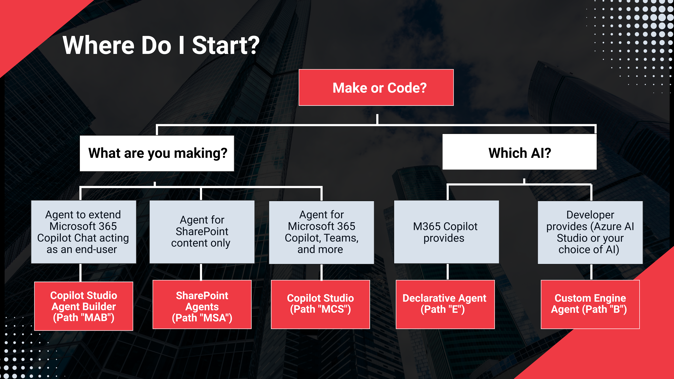
The left side of the tree represents Copilot Studio, Microsoft’s “make” or low-code family of tools. The right side represents Azure AI Foundry, the “code” or pro-code family of tools. The idea is simple: if you’re a “maker,” you use Copilot Studio. If you’re a “coder,” you use Azure AI Foundry.
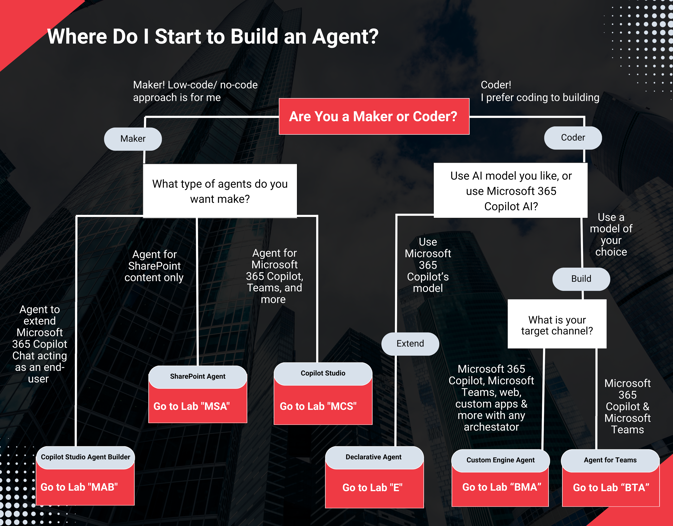
While this framework is helpful for orienting people who are learning how to build Copilot agents, it should be viewed as a starting point for students rather than for business decision makers. In client engagements, we often consider factors beyond skill sets, such as scale, governance, and long-term strategy, before recommending the right tool.
Our customers don’t come to us saying, “I’m a maker” or “I’m a coder.” They come to us with a problem they need solved. From that starting point, we evaluate both toolsets. Sometimes Copilot Studio is the fastest and most cost-effective way forward. Other times, Azure AI Foundry provides the scalability and governance required. In many cases, both are viable options, it’s about choosing the right tool for the business need, not just the skill set of the person building it.
That’s why I look at Microsoft’s decision tree as an entry point into the conversation, rather than a definitive answer. Our role is to guide clients through the nuance and help them make the right choice for their specific scenario
My Rule of Thumb
When in doubt, I start with Copilot Studio. You can build a prototype quickly, evaluate whether it meets your needs, and get early feedback from users. If it’s successful, great, you’ve saved time and money. If it runs into limitations, you haven’t wasted months; you can take the lessons learned and build a scalable solution in Azure AI Foundry.
This approach balances experimentation with long-term planning. It avoids over-engineering early, while still keeping a clear path forward when your organization is ready to scale.
Key Takeaways for Technology Leaders
Match the tool to your scale. Copilot Studio is perfect for smaller projects and rapid pilots. Azure AI Foundry is designed for enterprise deployments.
Consider who will own it. Copilot Studio empowers SMEs; Azure AI Foundry requires developers and IT teams.
Think long-term. Starting with Copilot Studio doesn’t lock you in, you can transition to Foundry as your needs grow.
Choose speed when testing, scale when proven. This balanced approach delivers both agility and sustainability.
Final Thoughts
Copilot Studio and Azure AI Foundry are not competitors,they’re complementary. One gives you speed and accessibility; the other gives you scale and power. Choosing between them isn’t about picking the “better” tool, it’s about choosing the right tool for your stage of maturity, your knowledge base, and your team.
At Emergent Software, we’ve delivered projects using both approaches. My advice is simple: start small with Copilot Studio, and grow into Azure AI Foundry when the time is right.
Contact Emergent Software if you’re ready to explore AI agents. Whether you’re prototyping or planning an enterprise rollout, we’ll help you choose the right toolset and make it work for your organization.
TL/DR
Choosing between Microsoft Copilot Studio and Azure AI Foundry comes down to scale, ownership, and long-term needs.
Copilot Studio is best for smaller knowledge bases (under ~500 documents), fast pilots, and scenarios where business subject matter experts, not IT, will manage the solution. It is quick, cost-effective, and tightly integrated with Microsoft 365.
Azure AI Foundry is built for enterprise-grade deployments. It supports thousands of documents, complex governance, and advanced customization (including non-Microsoft or fine-tuned models). It requires developers and IT ownership but offers more flexibility and scale.
Practical approach: Start small in Copilot Studio to validate your use case. If it grows in complexity or scale, transition to Azure AI Foundry.
Key takeaway: These platforms are not competitors. Copilot Studio gives you speed and accessibility. Foundry provides power and scalability. The right choice depends on your stage of maturity and your business problem, not whether you are a “maker” or a “coder.”
FAQs
Can I start with Copilot Studio and later move to Azure AI Foundry?
Yes, and this is a very common path. Copilot Studio is excellent for proving value quickly. Once your use case expands, whether through more documents, stricter compliance needs, or more advanced logic, you can transition to Azure AI Foundry. Many organizations treat Copilot Studio as the “first step” in their AI journey.
Is Copilot Studio only for Microsoft 365 scenarios?
Not at all. While it integrates tightly with Microsoft 365 apps like Teams and SharePoint, it also connects to hundreds of other systems through Power Platform connectors. That said, if your use case is heavily focused outside of M365 or requires advanced multi-channel support, Azure AI Foundry may be the better fit.
What if I’m not sure which LLM I need?
Copilot Studio currently uses Microsoft’s GPT-4/4.1 models. If you know you’ll need to experiment with other models, or you have plans to fine-tune a custom model, Azure AI Foundry is the platform you’ll want. If you’re still experimenting, Copilot Studio is a low-cost way to validate your use case first.
How do security and governance differ between the two?
Copilot Studio inherits the security and compliance framework of Power Platform and Microsoft 365, which is robust for many business needs. Azure AI Foundry, however, provides deeper enterprise-level controls over governance, compliance, and data residency. For organizations in highly regulated industries, finance, healthcare, government, Foundry is usually the safer long-term choice.
Will my business users be able to manage agents in Azure AI Foundry?
Typically, no. Azure AI Foundry requires professional developers to build and maintain agents. Business SMEs may help define the logic or provide data, but the ongoing management will almost always sit with IT or a development team. That’s why many organizations prefer to start in Copilot Studio when empowering non-technical users is a priority.
What about cost differences?
Copilot Studio is usually less expensive up front. It doesn’t require the same level of development resources and can often be maintained by business staff. Azure AI Foundry, on the other hand, requires more initial investment but pays off when you need scale, performance, and advanced capabilities. A practical approach is to start with Copilot Studio, demonstrate ROI, and then justify the move to Foundry once the business case is clear.
How do I know if my knowledge base is “too big” for Copilot Studio?
In my experience, the tipping point happens around 500–600 documents. At that point, you’ll notice slower performance or difficulty managing updates. That’s the signal that Foundry may be the better long-term fit.