
In This Blog
- Introduction: Craft + AI, Not Code First
- From Bricklayers to World Builders
- Responsible AI Use: Guardrails & Standards
- Practical Patterns for AI + Developer Workflows
- When You Still Write by Hand
- Checklists You’ll Want (Hiring, Governance, Prompts)
- Download the Full Guide
- Frequently Asked Questions
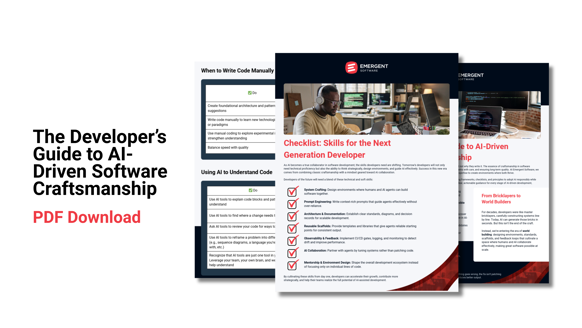
Insights from this blog were pulled from Emergent Software’s Developer’s Guide to AI-Driven Software Craftsmanship downloadable PDF. For more value, download the full guide for free here.
Introduction: Craft + AI, Not Code First
Craft + AI
AI is rewriting how software is built. Models can scaffold modules, generate boilerplate, and suggest endpoints within minutes. But speed alone does not equal quality.
The true challenge, and opportunity, lies in crafting the environment in which AI operates. When done right, AI becomes a force multiplier. Used poorly, it introduces drift, inconsistency, or worse, fragile systems.
This post lays out core principles, patterns, and pitfalls and invites you to download the full PDF guide, which includes detailed checklists (hiring, prompt governance, review policies), case studies, and architectural decision templates.
From Bricklayers to World Builders
Developers have long built systems brick by brick. AI can now supply many of those bricks. That doesn't change why we build, it changes how we do so reliably and at scale.
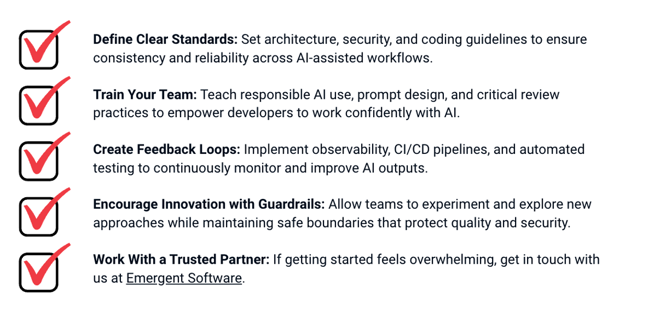
To succeed, we must shift our focus from individual code artifacts to system contexts:
- Standards & Governance: decision records, architectural boundaries, consistency rules
- Scaffolds & Templates: reusable modules and frameworks that align with your domain
- Feedback Loops: CI/CD gates, static analyzers, drift detectors, observability
Responsible AI Use: Guardrails & Standards
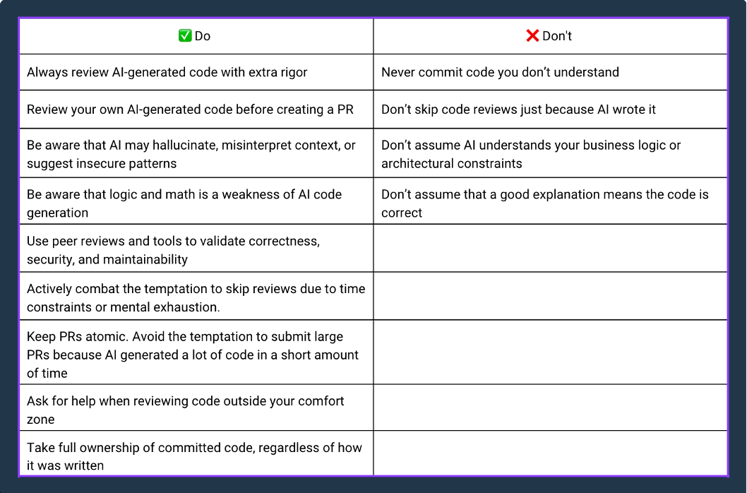
AI offers incredible leverage, but left unchecked, it risks quality, security, and compliance. At Emergent, we codify guardrails that all teams adhere to. (The full version with rationale lives in the PDF.)
Core Do’s
- Prohibit ingestion of client or proprietary code for AI training
- Encrypt data in transit; adhere to licensing
- Prefer private or smaller models when feasible
- Maintain version traceability: who asked, when, prompt version
- Always have human review & sign-off before changes hit production
- Periodic audit of AI outputs for drift, bias, or degradation
Core Don’ts
- Never let AI decide architecture or high-stakes logic
- Don’t skip reviews because “AI wrote it”
- Don’t expose IP, client secrets, or sensitive data
- Don’t accept output you don’t understand
- Don’t rely on AI wholesale without verification
These guardrails transform AI from a risky novelty to a productive partner.
Practical Patterns for AI + Developer Workflows
Here are workflows and patterns we use to balance speed with control:
- Scaffold & Module Bootstrapping: Use AI to generate CRUD operations, DTO classes, unit test stubs, or style skeletons.
- Prompt Contexting: Always supply domain context, relevant code snippets, constraints, and expectations in your prompt.
- Incremental Generation: Don’t try to generate a full feature in one shot. Build piece by piece, validate at each step.
- Review & Refactor: Treat AI output as a draft. Refine to match standards, optimize, and ensure maintainability.
- Doc-as-Code / API Summaries: AI can generate documentation stubs, method summaries, or interface descriptions—but review for accuracy.
- Instrumentation Suggestions: Ask AI for logging, metrics, or alert scaffolding — but validate and integrate intentionally.
These patterns become your scaffold for control, consistency, and drift mitigation.
When You Still Write by Hand
Certain tasks are better tackled manually... not because AI can’t, but because human insight is critical:
- Core architecture, domain modeling, and foundational design
- Prototyping new concepts or patterns
- Refactoring complex or legacy logic
- Crafting security-sensitive or high-stakes pathways
- Learning new paradigms or libraries
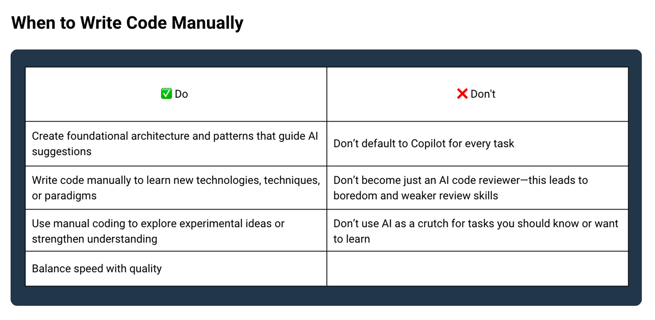
Writing by hand keeps your team sharp. It helps you understand what’s going on under the hood and spot where AI might fail.
Checklists You’ll Want (Hiring, Governance, Prompts)
Here are some of the checklists included in the full PDF — which you’ll want to drop into your team’s process immediately:
- Hiring & Interviewing for AI-Ready Engineers
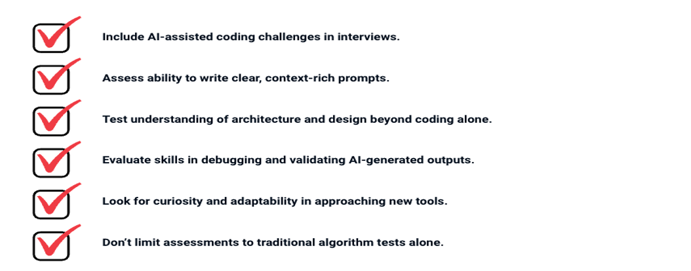
- Governance & Review Checklist
- Prompt Design Checklist
Download the Full Guide
We’re not building software against AI. We’re building software with AI. With intention, structure, and discipline.
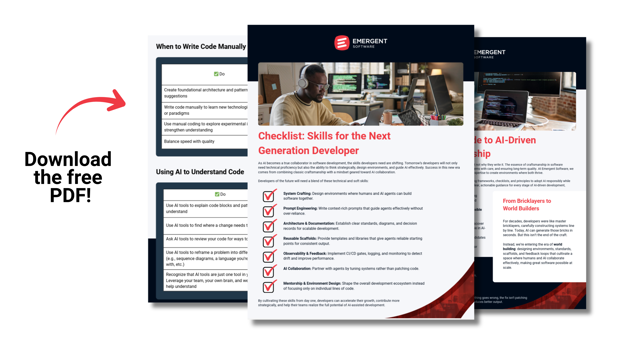
If your team is ready to bring AI into your development environment safely and effectively, the PDF guide contains everything you need: full checklists, architectural patterns, sample prompts, governance models, and case studies.
Download “AI-Driven Software Craftsmanship” Full PDF Guide
Make the PDF your team’s next step — use it to start your standards, invite discussion, and evolve your practices.
Frequently Asked Questions
Can AI design your entire application architecture?
In short: not reliably, and certainly not without human oversight. Architecture is more than diagrams and component outlines — it's a tapestry of trade-offs: performance, security, maintainability, domain rules, integration flows, operational constraints, and more. While AI can generate sample architecture diagrams or boilerplate structure, it lacks the deep judgment needed to evaluate trade-spaces in your real environment.
At Emergent, we view AI as a starter tool for architecture ideas, not the final authority. We often use AI to sketch component layouts, suggest class hierarchies, or propose layering strategies. But those drafts are just conversation starters. Senior engineers still lead the design, validate alternatives, and own architecture decision records (ADRs) that document rationale, constraints, and human judgment. Over time, AI can augment that process, but it should not replace it.
What happens when AI output is flawed, hallucinated, or subtly incorrect?
AI hallucinations and logic gaps are common. Many outputs look perfect: compile, pass tests, even behave in limited scenarios, but still harbor flaws.
At Emergent, we never treat AI output as final. Instead:
- Review as draft: Every AI suggestion is subject to peer review, domain validation, and test coverage.
- Incremental validation: We break down large features into small units so errors are caught early, not after full module integration.
- Static analyzers & linters: Use tools to detect code smells, complexity, dependency violations, or security anti-patterns.
- Behavioral tests: Use integration and property-based tests that check boundaries, edge cases, and domain invariants.
- Observability & runtime guards: In production, monitor metrics, logs, error rates, and set alerts for drift or anomalies.
- Prompt provenance & versioning: We track which prompts and model versions were used to generate code, so we can trace root causes of errors if they emerge.
Errors caught in the review or test pipeline never make it to production. The human is always in the loop, and final responsibility always lies with a developer or architect.
Could AI eventually replace developers?
No, at least not in any meaningful, positive way. But the nature of developer work will shift.
AI can dramatically reduce the time spent on routine, repetitive tasks. That means software can be built faster. That also means more capability, more ideas, more scope, which demands more engineering, not less.
The core strengths of developers go beyond writing code:
- Interpreting business context and priorities
- Making architecture and design trade-offs
- Understanding system performance, scaling, failure modes
- Integrating with existing systems and complex APIs
- Navigating ambiguous requirements and evolving business domains
- Mentoring, communicating, and aligning teams
In the future, developers will increasingly become system stewards, guiding AI, building scaffolds, designing workflows, enforcing quality, and ensuring alignment of technology with outcomes. The value shifts from churning code to orchestrating high-leverage systems.
Which AI models, tools, or platforms do you recommend?
There’s no one-size-fits-all. The right choice depends on your priorities. Here’s how we think about it:
- Security & privacy: If code or data cannot leave your environment, a local or private model is preferable.
- Latency & integration: For real-time generation inside IDEs or CI pipelines, low-latency models (on-prem or edge) work better.
- Cost & scale: Larger models cost more and may have usage constraints; smaller or domain-fine-tuned models may suffice for many tasks.
- Licensing and ingestion policies: Always verify whether the AI tool ingests your data for training or retains snippets from your code.
- Ecosystem and plugin support: Tools that integrate into your existing toolchain (IDE, CI/CD, monitoring) are often more productive.
At Emergent, we often start with modular experimentation. One AI model in one domain (test scaffolding), validate it, and then expand. We don’t commit to a single provider prematurely. We version prompts and track model drift. We stay agile and adapt as new models emerge.
How do you manage prompt drift, decay, or prompt deprecation over time?
Prompt engineering is not static. As your domain, architecture, or constraints evolve, old prompts may degrade or produce inconsistent output.
Here’s how we control prompt decay:
- Prompt catalog with metadata: Store prompt templates with version, domain, date, author, model version, and performance notes.
- Periodic audits: Regularly sample output from each prompt variant, review for drift, and retire or refine prompts when necessary.
- Change coordination: If your system, domain, or library changes (e.g. new framework update), review all prompt templates that reference those elements.
- Fallback policies: If a prompt fails to produce “good enough” output (by qualitative or quantitative threshold), fall back to human-only paths or flag for review.
- Observation & metrics: Monitor error rates, review rework, and anomalies associated with prompt-derived code. Use those metrics to trigger prompt rework.
Prompt engineering becomes a living discipline, not a one-and-done.
How do you onboard or train teams to use AI responsibly?
Effective adoption is more than giving engineers access to AI... it’s building maturity. Here’s how we do it:
- Guided workshops & labs: Start with paired sessions where senior engineers and juniors use AI together, critique outputs, and discuss prompt strategies.
- Prompt playbooks: Publish internal examples of high-quality prompts, edge-case modifications, and failure cases.
- Prompt review rounds: Regular team reviews of prompt output and prompt improvements.
- Retrospective culture: Ask “why did AI get it wrong?” during sprint retrospectives, and capture learnings.
- Rotations & challenges: Encourage rotations of “manual-only” sprints or tasks to keep critical thinking sharp.
- Governance forums: Monthly or quarterly reviews of AI tool usage, prompt drift, security reviews, and emerging innovations.
Over time, team members internalize prompt heuristics, understand failure modes, and mentor one another, turning AI from a novelty into a reliable teammate.