

In This Blog
TL;DR
IaaS provides virtualized computing resources, servers, storage, and networking, over the internet on a pay-as-you-go basis, eliminating the need for physical infrastructure.
Key benefits include rapid scalability to match demand, cost-effectiveness by paying only for resources used, high reliability through distributed data centers, and reduced maintenance burden.
IaaS consists of three main components: compute (virtual machines), storage (block, object, and file storage), and networking (virtual networks, load balancers, VPNs).
Common use cases include website hosting, disaster recovery, development and testing environments, and big data analysis.
Microsoft Azure is a leading IaaS provider with strong integration with Microsoft's ecosystem and enterprise-grade security features.
What Is IaaS?
Infrastructure as a Service (IaaS) is a cloud computing service that provides virtualized computing resources over the internet. The ability to rent virtual servers with pay-as-you-go pricing has revolutionized the way companies access computing resources.
Shortly put, IaaS is a cloud computing model that provides virtualized computing resources over the internet on a pay-as-you-go basis. Its core components include compute, storage, and networking.
The term IaaS was first popularized with the release of the AWS Elastic Compute Cloud (EC2) instance back in 2006. Microsoft and other tech giants soon followed suit and entered the IaaS market, each offering additional services and unique selling points, such as support for machine learning and artificial intelligence.
Think of IaaS as renting computing infrastructure the same way you'd rent office space. Instead of buying servers, networking equipment, and storage arrays that sit in your data center, you rent virtual equivalents that run in the cloud provider's data centers. You get the same capabilities without the capital expense, maintenance burden, or physical space requirements.
You may also like: What is SaaS? Software as a Service Explained
Key Components of IaaS
To better understand what IaaS is, it's best to start by taking a closer look at its components.
Compute
Compute is the virtualized equivalent of a physical server. It involves the deployment of virtual machines with specific configurations of CPU, RAM, and storage to meet workload requirements without the need to manage an underlying hypervisor.
This allows businesses to run anything from simple web servers to more complex and demanding big-data applications. You can spin up a virtual machine in minutes, configure it to your specifications, and start using it immediately. Need more processing power? Upgrade to a larger VM. Don't need it anymore? Delete it and stop paying.
Some providers also offer specialized compute options, such as graphics processing units (GPUs) for high-performance tasks like machine learning training or rendering, and field-programmable gate arrays (FPGAs) for custom hardware acceleration.
Storage
IaaS offers different types of storage solutions for different use cases. Common options include block storage, object storage, and file storage.
Block storage works similarly to traditional hard drives, storing data in fixed-size blocks. It's ideal for databases and applications requiring fast access to structured data. When you need the performance characteristics of a traditional hard drive but in the cloud, block storage is the answer.
Object storage is designed for storing unstructured data like images, videos, or backups. It's highly scalable and cost-effective, making it suitable for large-scale data storage. Data is stored in the form of objects with metadata. Object storage can scale to petabytes and beyond, making it perfect for data lakes and archives.
File storage provides a shared file system that multiple virtual machines can access. It's perfect for applications that need file-level access, such as content management systems or shared development environments where multiple users need to access the same files.
Networking
IaaS comes with many advanced networking capabilities to ensure secure and efficient communication between virtual machines, on-premise infrastructure, and the internet. Some of its key networking components include virtual networks, load balancers, virtual private networks, and security groups.
Virtual networks are isolated networks that users can configure within their IaaS environment to manage traffic and improve infrastructure security. You can create subnets, define routing rules, and control how resources communicate with each other and the outside world.
Load balancers are used for distributing incoming traffic across multiple workloads to improve performance and availability. If one server fails, the load balancer automatically routes traffic to healthy servers, ensuring your application stays available.
Virtual private networks (VPNs) can secure the connections between the IaaS environment and on-premises infrastructure for hybrid cloud deployments. This allows you to extend your existing network into the cloud securely.
Firewalls and security groups provide essential security measures to control and monitor incoming and outgoing traffic. They protect against unauthorized access and attacks by allowing you to define rules about what traffic is permitted and what should be blocked.
You may also like: Cloud Migration: The Lift and Shift Process
Important Benefits of IaaS
IaaS solutions offer several compelling benefits that have driven widespread adoption across organizations of all sizes.
Scalability and Flexibility
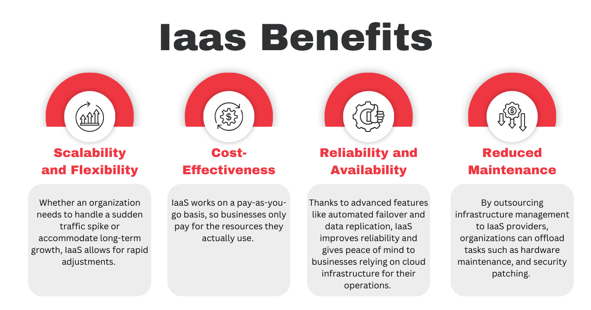
One of the most significant benefits of IaaS is its ability to scale resources up or down based on demand. Whether an organization needs to handle a sudden traffic spike or accommodate long-term growth, IaaS allows for rapid adjustments. This feature can significantly reduce business costs by eliminating the need for upfront hardware investments.
Scalability is especially useful for companies with variable workloads or seasonal traffic. An e-commerce site can scale up servers during Black Friday and scale back down in January. A tax preparation service can add capacity in March and April, then reduce it the rest of the year. You pay only for what you need when you need it.
Cost-Effectiveness
IaaS works on a pay-as-you-go basis, so businesses only pay for the resources they actually use. This eliminates the need for large upfront investments into physical infrastructure, reducing overall costs. Right-sizing, which involves provisioning the number of resources a workload needs rather than as much as possible, helps avoid over-provisioning.
Many IaaS providers offer cost management tools and calculators to help companies estimate and control their spending. This way, they can get the best value for their investment. You can also take advantage of pricing options like reserved instances for predictable workloads or spot instances for flexible, interruptible workloads at significantly reduced rates.
Reliability and Availability
Most IaaS providers offer service level agreements (SLAs) that guarantee high availability and uptime. Their data centers are distributed worldwide to ensure that applications and data are accessible even in the event of hardware failures or natural disasters.
Thanks to advanced features like automated failover and data replication, IaaS improves reliability and gives peace of mind to businesses relying on cloud infrastructure for their operations. If a data center experiences an outage, your applications can automatically fail over to another region with minimal disruption.
Reduced Maintenance
By outsourcing infrastructure management to IaaS providers, organizations can offload tasks such as hardware maintenance and security patching. In turn, IT teams can focus on core business activities and strategy instead of wasting resources on maintaining infrastructure.
This reduced operational burden can greatly increase efficiency and productivity, enabling businesses to innovate and respond faster to changing market demands. You don't need to worry about replacing failed hard drives, upgrading firmware, or maintaining cooling systems. The provider handles all of that.
Common Use Cases
IaaS can support a wide range of use cases in many industries. It's used for nearly anything, from website hosting and development environments to disaster recovery and even big data analysis.
Website and Application Hosting
IaaS is ideal for hosting websites and applications because it scales resources efficiently as traffic fluctuates. Businesses can use it to deploy workloads and load balancers that ensure optimal performance and availability.
The ability to quickly provide additional resources eliminates unnecessary downtime, improving user satisfaction. Times of peak traffic are no longer a concern for companies that choose to employ IaaS services. If your website gets featured on a major news site and traffic spikes 10x, you can automatically scale to handle the load.
Disaster Recovery and Business Continuity
Disaster recovery and business continuity are another major concern for businesses. With IaaS services, they get access to advanced solutions to tackle these challenges.
By replicating data and applications across multiple data centers and geographical regions, businesses can quickly recover from outages and minimize downtime. Automated backup and recovery features help protect from data loss and reduce restoration time. IaaS makes enterprise-grade disaster recovery accessible to organizations that couldn't afford to maintain redundant data centers themselves.
Development and Testing
Developers use IaaS to create isolated environments for development and testing. These environments enable faster resource provisioning, easier configuration management, and more efficient collaboration between IT teams.
With support for agile development methods such as continuous integration and continuous deployment (CI/CD), IaaS can significantly accelerate software development cycles. Developers can spin up test environments in minutes, run their tests, and tear them down when finished, paying only for the time used.
Big Data Analysis
IaaS can even provide the necessary computing power and storage capacity for big data analysis. Big data companies use their scalable infrastructure to process and analyze large datasets. This makes it much easier to derive valuable insights and shift to data-driven decision-making.
Some IaaS providers offer additional services for big data processing, such as distributed computing frameworks that are used for massive datasets. Organizations can provision clusters with hundreds or thousands of nodes to process petabytes of data, then scale back down when the analysis is complete.
Largest IaaS Providers
The IaaS market consists of many providers, each offering a wide range of services and features. At Emergent Software, we recommend Microsoft Azure.
Microsoft Azure
One of Azure's core selling points is how easy it is to integrate with other services in Microsoft's software ecosystem. In addition to that, it has dedicated support for hybrid cloud environments and comes with enterprise-grade security features.
Azure's native compatibility with products like Windows Server, SQL Server, and Active Directory makes it the top choice for companies invested in the Microsoft ecosystem. Organizations can extend their existing on-premises Windows environments into Azure seamlessly, using familiar tools and processes.
Azure also offers comprehensive compliance certifications and data residency options, making it suitable for highly regulated industries like healthcare and finance.
How Emergent Software Can Help
We specialize in helping organizations leverage Microsoft Azure IaaS to modernize infrastructure, improve reliability, and reduce costs. Our team has extensive experience designing Azure infrastructure architectures, migrating workloads to Azure, optimizing Azure environments for performance and cost, and implementing security and compliance controls. Whether you're moving from on-premises data centers to Azure, optimizing existing Azure deployments, or building new cloud-native applications on Azure infrastructure, we provide the expertise and guidance to ensure successful outcomes. We help organizations right-size resources, implement automation, establish governance frameworks, and build the skills needed to operate effectively in the cloud.
If this sounds familiar, we can help.
Final Thoughts
IaaS revolutionizes how businesses manage computing resources by offering virtualized infrastructure on a pay-as-you-go basis. It supports a variety of applications, from web hosting to big data analysis, while enhancing scalability, reducing costs, and minimizing maintenance.
The shift to IaaS represents more than just moving servers from your data center to someone else's. It's a fundamental change in how organizations think about infrastructure. Instead of treating servers as assets you purchase and maintain for 3-5 years, IaaS treats infrastructure as a service you consume and pay for by the hour.
This shift has profound implications. Organizations can experiment with new ideas at minimal cost. A startup can launch on infrastructure that would have required hundreds of thousands in capital investment a decade ago. Enterprises can respond to market opportunities faster because they're not constrained by procurement cycles and hardware lead times.
The benefits extend beyond just cost and speed. IaaS providers invest billions in security, compliance, and operations. They employ specialists and build capabilities that individual organizations couldn't afford. When you use IaaS, you benefit from this investment. Your infrastructure runs in data centers with redundant power, cooling, and networking. Your data is protected by security teams that monitor threats 24/7. Your workloads benefit from the provider's continuous infrastructure improvements.
However, IaaS also requires organizations to develop new skills and adopt new operational models. You're no longer managing physical hardware, but you're managing virtual infrastructure at scale. You need to understand concepts like auto-scaling, load balancing, and multi-region architectures. You need tools and processes for provisioning, monitoring, and optimizing cloud resources. You need governance frameworks to prevent sprawl and control costs.
These challenges are surmountable, but they require intentional effort. Organizations that successfully leverage IaaS invest in training, adopt infrastructure-as-code practices, implement cost management disciplines, and establish clear governance policies. They treat cloud infrastructure as a capability to be developed rather than just a procurement decision.
The IaaS market continues to evolve rapidly. Providers add new services and capabilities constantly. Specialized compute options like GPUs and custom silicon accelerate specific workloads. Edge computing brings infrastructure closer to users. Serverless computing abstracts infrastructure even further. Organizations that stay current with these developments can leverage them to build better, faster, and more cost-effective solutions.
For most organizations, the question is no longer whether to use IaaS but how to use it effectively. The economics and capabilities are too compelling to ignore. The organizations that thrive are those that develop cloud infrastructure expertise, implement sound governance, and continuously optimize their cloud environments.
If you're ready to modernize your infrastructure with Microsoft Azure IaaS, Emergent Software is here to help. Reach out — we'd love to learn more about your goals.
Frequently Asked Questions
What is the difference between SaaS and IaaS?
SaaS (Software as a Service) and IaaS (Infrastructure as a Service) operate at different layers of the technology stack. SaaS provides complete applications over the internet that you access through a browser or app — think Microsoft 365, Salesforce, or Slack. You use the software but don't manage any of the underlying infrastructure, platform, or application code. The provider handles everything. IaaS, in contrast, provides the infrastructure layer — virtual machines, storage, and networking — that you use to build and run your own applications. You're responsible for installing operating systems, managing applications, configuring security, and handling updates. IaaS gives you more control and flexibility but requires more management. SaaS is simpler to use but less customizable. Many organizations use both: SaaS for standard business applications like email or CRM, and IaaS for custom applications and workloads that require specific configurations or integrations.
What is meant by IaaS?
IaaS stands for Infrastructure as a Service. It's a cloud computing model where a provider offers virtualized computing resources over the internet. Instead of purchasing and maintaining physical servers, storage arrays, and networking equipment in your own data center, you rent virtual equivalents from a cloud provider. The provider owns and operates the physical infrastructure in their data centers, while you use and pay for virtual resources as needed. IaaS provides the fundamental building blocks of computing — servers (compute), storage, and networking — but abstracts away the physical hardware. You can provision virtual machines, configure networks, attach storage, and build complete IT environments without ever touching physical equipment. The "as a Service" part means you're consuming infrastructure as a utility, paying for what you use rather than making large capital investments. This model shifts IT spending from capital expenditure (buying hardware) to operational expenditure (renting infrastructure).
How do you explain IaaS to someone non-technical?
IaaS is like renting computer equipment instead of buying it, except the equipment is virtual and accessed over the internet. Imagine you need to run a business application. Traditionally, you'd buy a server, set it up in an office or data center, install software on it, and maintain it yourself. With IaaS, instead of buying that physical server, you rent a virtual server from a cloud provider. It acts just like a physical server — you can install software, store data, and run applications — but it exists as software running on the provider's equipment in their data center. You access and manage it over the internet. The big advantages are that you can get a virtual server in minutes instead of weeks, you can easily make it bigger or smaller as needed, you only pay for what you actually use, and you don't have to worry about hardware breaking or becoming obsolete. It's similar to how streaming services like Netflix replaced video rental stores — instead of owning physical media, you access content over the internet and pay for what you use.
What is an example of IaaS?
Microsoft Azure is a leading example of IaaS. With Azure, you can create virtual machines running Windows or Linux, provision storage for files and databases, configure virtual networks with subnets and security rules, set up load balancers to distribute traffic, and deploy complete application environments — all without purchasing or managing physical hardware. A practical example might be a company moving their on-premises file server to Azure. Instead of maintaining a physical Windows Server in their office, they create an Azure Virtual Machine, attach Azure Disk Storage, configure backup and disaster recovery, and connect it to their office network via VPN. Employees access files the same way they always have, but the infrastructure now runs in Azure's data centers. The company benefits from improved reliability, automated backups across regions, the ability to scale storage as needed, and elimination of hardware maintenance, all while paying only for the resources consumed. Other major IaaS providers include Amazon Web Services (AWS) and Google Cloud Platform (GCP), but at Emergent Software, we specialize in Microsoft Azure.
What are the three main components of IaaS?
The three fundamental components of IaaS are compute, storage, and networking. Compute provides processing power through virtual machines that act like physical servers but run as software. You can provision VMs with specific configurations of CPU, memory, and operating system to run your applications. Different VM sizes offer different performance characteristics for different workloads. Storage provides places to keep data, with several types available: block storage acts like traditional hard drives for databases and applications, object storage handles unstructured data like images and backups at massive scale, and file storage provides shared file systems accessible from multiple VMs. Networking connects everything together, including virtual networks that isolate and organize your resources, load balancers that distribute traffic across multiple servers, VPNs that securely connect cloud resources to on-premises infrastructure, and firewalls that control traffic and enforce security policies. Together, these three components provide the complete infrastructure foundation needed to build and run applications in the cloud. Most IaaS providers offer additional services beyond these basics, but compute, storage, and networking form the essential core that every IaaS platform provides.
Is Azure a SaaS or IaaS?
Azure is both a SaaS and IaaS provider — in fact, it offers services across all cloud service models. As an IaaS provider, Azure offers virtual machines, storage, and networking that you can use to build and run your own applications and infrastructure. You have control over the operating systems, applications, and configurations. As a SaaS provider, Azure offers complete applications like Microsoft 365, Dynamics 365, and Azure DevOps that you use without managing underlying infrastructure. Azure also provides PaaS (Platform as a Service) offerings like Azure App Service, Azure SQL Database, and Azure Functions that sit between IaaS and SaaS — you focus on your application code while Azure manages the platform. This full-stack capability is one of Azure's strengths. You can choose the right service model for each workload. Use IaaS virtual machines for applications that need specific configurations, PaaS services for faster development with less management overhead, and SaaS applications for standard business functions. Many organizations use a mix of all three, and Azure's comprehensive portfolio allows you to build complete solutions using the most appropriate services for each component.
Author



Let’s Start Building Together
Whether you're modernizing legacy apps, strengthening your cloud security, or planning your next big initiative, Emergent Software is here to help.


