

In This Blog
TL;DR
SaaS delivers software over the internet via subscription, eliminating the need for local installation, hardware management, or manual updates.
Key benefits include accessibility from anywhere, lower upfront costs through subscription pricing, automatic scalability, and effortless updates managed by the provider.
Multi-tenancy architecture allows multiple customers to share the same application instance while keeping data isolated and secure.
Common SaaS applications include CRM systems like Salesforce, ERP platforms like Microsoft Dynamics, and collaboration tools like Microsoft 365.
SaaS has transformed software access for businesses of all sizes by making enterprise-grade applications accessible without significant infrastructure investment.
What Is SaaS?
Software as a Service (SaaS) is a cloud-based software delivery model that allows end users to access applications without needing to manage the underlying infrastructure. Instead, the hardware and software infrastructure are managed by a third-party software provider.
While the concept of SaaS has been around for some time, the SaaS model we know today first emerged and gained popularity in the early 2000s. The mass adoption of the internet and advancements in cloud technology set the stage for this evolution. Tech giants were the first to offer software products over the internet. Once it was demonstrated that the SaaS model was highly successful, it was quickly adopted across many industries.
Put simply, Software as a Service is a software distribution model that involves hosting applications with third-party providers and accessing them over the internet. The traditional software distribution model, in contrast, relies on storing applications locally on each device where the user needs to install and maintain the software to keep it working.
Think about the shift from buying Microsoft Office on a CD-ROM that you installed on your computer to subscribing to Microsoft 365 and accessing Word, Excel, and PowerPoint through your browser. That's the fundamental difference SaaS represents.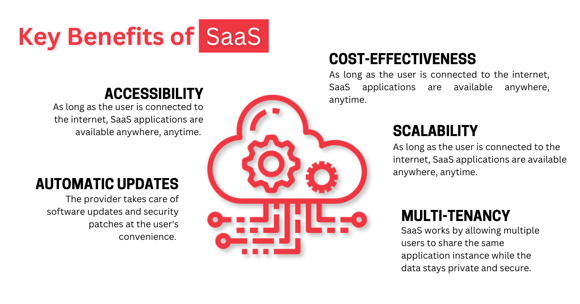
Key Benefits of SaaS
The SaaS model offers compelling advantages that have driven its widespread adoption across organizations of all sizes.
Accessibility
As long as the user is connected to the internet, SaaS applications are available anywhere, anytime. This is especially useful for remote work and globally distributed workforces. Employees can access the same applications and data whether they're in the office, working from home, or traveling internationally.
Cost-Effectiveness
SaaS works on a subscription-based pricing model that spreads costs over time. There is no longer any need for upfront investments in software licenses or hardware infrastructure. Organizations can predict costs more accurately and avoid the capital expenditure of purchasing and maintaining on-premises software and servers.
Scalability
Since the end user doesn't need to manage the infrastructure, applications are much easier to scale when data volumes increase or user counts grow. Need to add 50 new employees next month? With SaaS, it's as simple as adjusting your subscription. No need to provision new servers or worry about capacity planning.
Automatic Updates
The provider takes care of software updates and security patches at the user's convenience. Getting the latest features is effortless. You wake up one morning and new functionality is available, no installation required, no IT project, no downtime.
Multi-Tenancy
SaaS works by allowing multiple users to share the same application instance while the data stays private and secure. This allows for more efficient resource utilization and reduced costs. The provider can optimize infrastructure across all customers rather than each organization running separate instances.
You may also like: What Is IaaS? Infrastructure as a Service Explained
How SaaS Works
Software companies that use the SaaS delivery model can either host their applications on their own servers or via third-party cloud providers. Their customers access these applications over the internet, usually through a web browser. This streamlines software deployment, management, and maintenance and provides a more secure but convenient user experience.
You may also like: SaaS, PaaS, and IaaS: Differences and Use Cases Explained
Multi-Tenancy Architecture
One of the most important aspects of how SaaS works is multi-tenancy architecture. Put briefly, this means that a single application instance can be provided to multiple customers (tenants) while still ensuring each customer's data is isolated and invisible to other customers.
Thanks to this architecture, SaaS providers can use resources more efficiently without compromising on security. They can also quickly release updates and features to all customers simultaneously. When a SaaS provider fixes a bug or adds a new feature, every customer benefits immediately without individual deployments.
Cloud Computing Foundation
Another important SaaS aspect is cloud computing. Cloud providers supply the complete infrastructure necessary for software delivery, including servers, storage, and networking. The flexibility of such solutions allows SaaS providers to scale resources based on demand, improving performance and reducing costs.
In addition to that, cloud infrastructure can significantly improve availability and redundancy. SaaS applications typically run across multiple data centers and geographic regions, ensuring high uptime and disaster recovery capabilities that would be prohibitively expensive for most organizations to build themselves.
Common SaaS Use Cases
When it comes to SaaS use cases, the first thing that usually comes to mind is improving operations and productivity. This includes software for customer relationship management, enterprise resource planning, and human resources.
You may also like: Cloud Migration Techniques: What Is Lift and Shift?
Business Operations and Productivity
Customer Relationship Management (CRM) — Applications like HubSpot and Salesforce help companies manage their interactions with customers, including sales processes and marketing campaigns. They can give deep insights into customer behavior, and in turn, improve engagement and customer satisfaction. Sales teams can track leads, opportunities, and customer communications in one centralized system accessible from anywhere.
Enterprise Resource Planning (ERP) — Applications like Microsoft Dynamics and NetSuite integrate important business processes from finance to supply chain management. By having a unified view of business operations, companies can make more informed decisions. Instead of maintaining separate systems for accounting, inventory, and operations, ERP systems provide a single source of truth.
Human Resource Management (HRM) — Applications like Gusto and Rippling are great for streamlining the entire HR process. This includes recruitment, performance and engagement tracking, and payroll. By utilizing HRM solutions, HR specialists can better manage their workforce and improve its satisfaction.
Collaboration and Communication
Another important use case is effective collaboration. Collaboration is a core aspect of any business and SaaS providers offer many tools to help take it to the next level. Email, messaging, and conferencing are the most common examples.
Office Application Suites — Suites such as Microsoft 365 are now available as SaaS subscriptions. Users can create documents, spreadsheets, and presentations from any device with internet access, with changes automatically saved to the cloud and available across all devices.
Messaging Applications — Platforms like Microsoft Teams improve real-time communication with instant messaging, easy file sharing, and APIs for integrating third-party apps. Teams can collaborate in channels organized by project or topic, reducing email overload and keeping conversations organized.
Conferencing Applications — These make it possible for companies and teammates to host virtual meetings, conferences, and webinars more flexibly and globally. The rise of remote work has made video conferencing SaaS applications essential for maintaining face-to-face connections across distributed teams.
How Emergent Software Can Help
We specialize in helping organizations implement and optimize SaaS solutions, particularly within the Microsoft ecosystem. Our team has extensive experience migrating organizations to Microsoft 365, implementing Microsoft Dynamics for ERP and CRM, and integrating SaaS applications with existing systems and workflows. Whether you're transitioning from on-premises software to SaaS, optimizing your existing SaaS investments, or building custom integrations between SaaS platforms and other business systems, we provide the strategic guidance and technical expertise to ensure successful outcomes. We help organizations maximize the value of SaaS by ensuring proper configuration, user adoption, security implementation, and ongoing optimization.
If this sounds familiar, we can help.
Final Thoughts
SaaS is transforming how businesses access and use software by providing cloud-based applications that eliminate the need for managing underlying infrastructure. This model offers flexibility, scalability, and cost-effectiveness, making complex enterprise applications accessible to businesses of all sizes.
The shift to SaaS represents more than just a different way to license software — it's a fundamental change in how organizations think about technology. Instead of treating software as a capital asset that you purchase and maintain, SaaS treats software as an operational service that you consume.
This shift has democratized access to enterprise-grade software. A startup with five employees can use the same CRM platform as a Fortune 500 company, paying only for what they need and scaling as they grow. Small businesses can access sophisticated business intelligence, project management, and collaboration tools that would have been financially out of reach in the on-premises software era.
The benefits extend beyond just cost and accessibility. SaaS providers can iterate and improve their products much faster than traditional software vendors. New features roll out continuously rather than waiting for annual major releases. Security patches deploy immediately to all customers. Innovation accelerates because providers can experiment with new capabilities and get immediate feedback from users.
However, SaaS also requires organizations to think differently about control, customization, and data. You're depending on a third party for availability and performance. Your data lives outside your direct control. Customization options may be more limited than with on-premises software. Integration with other systems requires APIs and connectors rather than direct database access.
These tradeoffs are acceptable for most organizations given the benefits, but they do require thoughtful evaluation. Not every application is a good fit for SaaS. Mission-critical systems with unique requirements, applications handling extremely sensitive data, or workloads with unusual performance characteristics may still warrant on-premises or custom-built solutions.
For the vast majority of business applications, though, SaaS has become the default choice. The question is no longer whether to use SaaS, but which SaaS platforms to choose and how to implement them effectively.
Organizations that successfully leverage SaaS focus on user adoption, integration, and continuous optimization. They invest in training so employees actually use the capabilities available. They integrate SaaS platforms with each other and with remaining on-premises systems to create seamless workflows. They regularly review usage and features to ensure they're getting value from their subscriptions.
If you're ready to implement SaaS solutions to improve efficiency and reduce costs, Emergent Software is here to help. Reach out — we'd love to learn more about your goals.
Frequently Asked Questions
What is SaaS, explained in simple terms?
SaaS is a way of delivering software where you access applications over the internet rather than installing them on your computer. Think of it like streaming Netflix instead of buying DVDs. Instead of purchasing software and installing it on your own servers or computers, you subscribe to access software that runs on the provider's infrastructure. You access it through a web browser or app, and the provider handles all the technical details like updates, security, and performance. You pay a subscription fee — usually monthly or annually — and can typically add or remove users as your needs change. This model eliminates the need for organizations to purchase expensive software licenses upfront, maintain servers, or employ specialized IT staff to manage software installations and updates.
What are examples of SaaS?
Common examples of SaaS include Microsoft 365 (including applications like Word, Excel, Outlook, and Microsoft Teams), Salesforce for customer relationship management, Slack for team communication, Zoom for video conferencing, Dropbox for file storage and sharing, QuickBooks Online for accounting, HubSpot for marketing automation, Shopify for e-commerce, and Adobe Creative Cloud for design tools. Even services you might not think of as "software" like Gmail, Google Docs, and Netflix are SaaS applications. The common thread is that you access these applications through the internet, typically via a web browser or mobile app, and the provider manages all the underlying infrastructure and software maintenance. You don't install software on your computer or server — you simply log in and use the application.
What is the difference between SaaS and traditional software?
Traditional software requires you to purchase a license, install the software on your computers or servers, and manage updates and maintenance yourself. You own the software but are responsible for everything that goes with it — hardware, backups, security, updates, and troubleshooting. SaaS, in contrast, is accessed over the internet on a subscription basis. The provider owns and manages the software, infrastructure, security, and updates. You simply access the application when you need it. Traditional software typically involves large upfront costs and periodic upgrade expenses, while SaaS spreads costs over time through subscription fees. Traditional software runs on your infrastructure and requires IT resources to maintain, while SaaS runs on the provider's infrastructure and requires minimal IT involvement. Updates happen automatically with SaaS, while traditional software requires planning and executing upgrade projects. The trade-off is that traditional software offers more control and customization, while SaaS offers more convenience and lower operational overhead.
How is SaaS delivered?
SaaS is delivered through web browsers or dedicated apps, accessed over the internet. Users typically navigate to a website or open an application, log in with their credentials, and access the software without any installation required. The application runs on the provider's servers in the cloud, and your browser or app simply displays the interface and sends your inputs back to those servers. This means the heavy computing happens on the provider's infrastructure, not on your device. You can access the same application from multiple devices — your desktop at work, your laptop at home, your phone while traveling — and see the same data and functionality everywhere. Most SaaS applications work on any modern web browser, though some offer native apps for desktop or mobile that provide enhanced functionality or offline capabilities. The delivery mechanism is transparent to users — they just access their applications through familiar interfaces without worrying about what's happening behind the scenes.
What are the security risks of SaaS?
SaaS introduces different security considerations compared to on-premises software. Your data resides with a third party, so you're dependent on their security practices and infrastructure. If the SaaS provider experiences a breach, your data could be compromised. Access controls become critical since applications are accessible from anywhere with internet access — a misconfigured permission could expose sensitive data. Integration with other systems creates additional attack surfaces. Compliance requirements may restrict which data can be stored with external providers or in certain geographic regions. User account compromise is a significant risk since SaaS applications are accessible from anywhere, making strong authentication essential. However, reputable SaaS providers typically invest far more in security than individual organizations could afford, with dedicated security teams, advanced monitoring, and certifications like SOC 2, ISO 27001, and compliance with regulations like HIPAA or GDPR. The key is choosing established providers with strong security track records, implementing proper access controls including multi-factor authentication, regularly reviewing user permissions, understanding data residency and compliance implications, and maintaining visibility into how your data is being accessed and used.
Can you customize SaaS applications?
Yes, but the level of customization varies significantly by application. Most modern SaaS platforms offer extensive configuration options that don't require code — you can customize fields, workflows, reports, dashboards, and user interfaces through administrative settings. Many SaaS applications also provide APIs that allow you to extend functionality through custom integrations or automations. Some platforms offer low-code or no-code tools for building custom features. However, SaaS customization is generally more constrained than with on-premises software where you can modify source code or directly access databases. This is intentional — limiting deep customization allows SaaS providers to maintain a single codebase that they can update quickly for all customers. The trade-off is that you might not be able to customize every aspect of the application to match your exact processes. In practice, most organizations find that configuring SaaS applications to match their needs provides sufficient flexibility, and the inability to over-customize actually forces helpful standardization of business processes. For truly unique requirements that SaaS platforms can't accommodate, organizations may need custom development or specialized applications alongside their SaaS tools.
Author



Let’s Start Building Together
Whether you're modernizing legacy apps, strengthening your cloud security, or planning your next big initiative, Emergent Software is here to help.


