

In This Blog
TL;DR
PaaS provides a complete platform for developing, deploying, and managing applications without managing underlying infrastructure.
PaaS sits between IaaS (infrastructure) and SaaS (software), offering managed infrastructure, integrated development tools, and runtime environments.
Key benefits include simplified development, faster time to market, automatic scalability, and cost efficiency through pay-as-you-go pricing.
PaaS architecture consists of three layers: infrastructure (servers and storage), platform (middleware and tools), and application (development interfaces).
Common use cases include web and mobile app development, API management, IoT applications, data analytics, and DevOps practices.
What Is PaaS?
Platform as a Service (PaaS) is a vital part of cloud computing. It offers a complete environment for software development, deployment, and management, bridging the gap between Infrastructure as a Service (IaaS) and Software as a Service (SaaS).
PaaS is a cloud computing model that delivers a complete platform for software development, deployment, and management. It sits right in the middle between IaaS which delivers infrastructure and SaaS which delivers software over the internet.
Another way to explain PaaS is that it integrates managed infrastructure, development tools, and runtime environments. This makes it easier for developers to focus on writing code instead of spending time managing the required resources.
Think about it this way: with IaaS, you rent virtual machines and manage everything from the operating system up. With SaaS, you simply use finished applications like Microsoft 365. PaaS falls in between — you write and deploy your code, while the platform handles the operating system, runtime, middleware, and infrastructure.
You may also like: What is SaaS? Software as a Service Explained
Short History of PaaS
The PaaS concept started to take shape in the mid-2000s, a time when the demand for cloud computing was on the rise. Tech giants were the first companies to launch PaaS platforms that enabled development and deployment on top of existing systems.
Over the years, more tech giants joined the PaaS market, introducing unique features and innovations to stay competitive in this growing industry. As a result, the evolution of PaaS involved many enhancements and will likely be continuously improved for many years to come.
The emergence of PaaS represented a significant shift in how developers build applications. Before PaaS, developers needed to provision servers, install and configure operating systems, set up databases, and manage all the infrastructure before they could even start writing application code. PaaS abstracted all of that complexity away.
3 Key PaaS Features
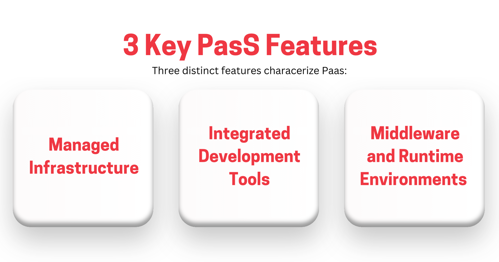
Three distinct features characterize PaaS:
Managed infrastructure
Integrated development tools
Middleware and runtime environments
Managed Infrastructure
PaaS providers take care of all the infrastructure management complexities, such as servers, storage, and networking. This way, developers and systems administrators no longer need to worry about the underlying infrastructure. Patching, scaling, and maintaining servers becomes the provider's responsibility, not yours.
Integrated Development Tools
Built-in development tools provide an integrated environment for creating, testing, and deploying applications. These tools include integrated development environments (IDEs), version control systems, and continuous integration/continuous deployment (CI/CD) pipelines. Developers can go from code to production without switching between disparate tools and platforms.
Middleware and Runtime Environments
Middleware and runtime environments are another core part of PaaS platforms. They are necessary for running applications, including database management systems, web servers, application servers, and more. The platform provides these components pre-configured and ready to use, eliminating setup and configuration overhead.
You may also like: Cloud Migration Techniques: What Is Lift and Shift?
PaaS Architecture
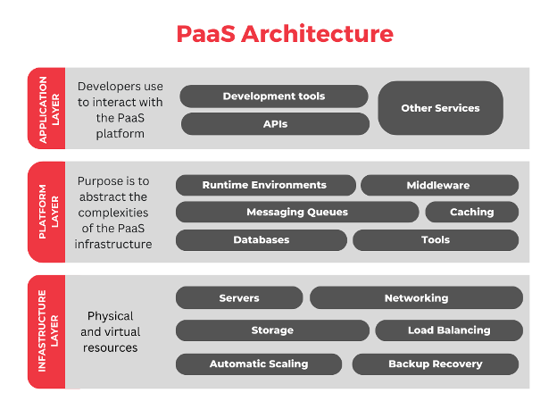
The architecture of PaaS can be divided into three main layers: the infrastructure layer, the platform layer, and the application layer. Understanding these layers helps clarify how PaaS delivers its capabilities.
1. Application Layer
Sitting at the top is the application layer that developers use to interact with the PaaS platform. It includes everything from development tools and APIs to various other services.
Developers can use IDEs, version control systems, and CI/CD pipelines to streamline their workflows. Monitoring and analytics tools help them further understand application performance and usage patterns, promoting continuous improvement. This is the layer where developers spend most of their time — writing code, testing, and deploying applications.
2. Platform Layer
Next up, there's the platform layer which brings all the tools, middleware, and runtime environments needed for software development. Its purpose is to abstract the complexities of the infrastructure, creating a seamless development environment for building, testing, and deploying applications.
This layer helps boost productivity and performance by including services such as databases, messaging queues, and caching. It also handles component orchestration, which allows different parts of an application to work together more effectively. The platform layer is what distinguishes PaaS from IaaS — it's the managed services and tooling that accelerate development.
3. Infrastructure Layer
The infrastructure layer is made of physical and virtual resources such as servers, storage, and networking. It serves as a foundation and is managed by the PaaS provider to ensure high availability and security of the underlying hardware.
This layer includes features like load balancing, automatic scaling, and backup recovery, which are essential for application performance and reliability. While developers rarely interact directly with this layer, it provides the robust foundation that everything else runs on.
Benefits of Platform as a Service
While there are countless benefits to PaaS platforms, this section will cover the most significant ones.
Simplified Development Process
PaaS providers offer a comprehensive set of tools and environments that help reduce the need for manual setup and configurations. Developers can immediately start focusing on writing code while benefiting from pre-built components and services that simplify the development lifecycle.
Instead of spending days or weeks setting up development environments, configuring databases, and establishing deployment pipelines, developers can start writing code within hours. The platform handles the tedious infrastructure work.
Reduced Time to Market
Another important benefit of PaaS is a shorter time to market. Integrated development and deployment tools make prototyping, testing, and deployment of applications consistent and efficient.
When you can go from idea to production in days instead of months, you can respond to market opportunities faster, test hypotheses more quickly, and iterate based on user feedback more frequently. This agility can be a significant competitive advantage.
Scalability and Flexibility
PaaS infrastructure has a highly scalable nature that supports varying application loads without the need for manual intervention. Companies can use it to automatically scale the required resources based on moment-to-moment demand. This feature improves performance stability while maintaining great cost efficiency.
If your application suddenly gets featured on social media and traffic spikes 10x, the platform automatically scales to handle the load. When traffic returns to normal, it scales back down, and you only pay for what you use.
Cost Efficiency
Speaking of cost-efficiency, this is a major feature of Platform as a Service. Eliminating the need to supply and maintain infrastructure leads to reduced spending. The pay-as-you-go pricing helps companies further by ensuring they only pay for the resources they use.
You avoid capital expenditure on servers and software licenses. You don't pay for idle capacity. And you don't need as large an infrastructure team because the platform handles much of the operational work.
PaaS Use Cases
PaaS platforms are highly versatile and can be applied to many different industries. Here are some common use cases to illustrate this point further.
1. Application Development and Deployment
PaaS is ideal for developing and deploying web and mobile applications. Software companies use its tools, libraries, and frameworks to greatly improve their complete software development lifecycle. From easy cloud deployment and scalability to advanced pre-built security features, these platforms are essential for anyone looking to build software solutions at scale.
Whether you're building a customer-facing web application, a mobile app backend, or an internal business application, PaaS provides the foundation and tooling to accelerate development and ensure reliable deployment.
2. API Development and Management
PaaS platforms offer a full set of tools for creating, testing, and managing APIs. This helps developers to not only design and secure APIs, but enables administrators to monitor their usage to keep them running efficiently over time.
Modern applications depend on APIs to integrate with other services and expose functionality to partners or customers. PaaS platforms provide API gateways, authentication mechanisms, rate limiting, and analytics to manage these critical interfaces.
3. IoT Applications
Another major use case involves Internet of Things (IoT). PaaS offers a strong infrastructure that can support large amounts of data generated by IoT devices. This includes features such as real-time processing, analytics, and visualization.
Additionally, PaaS platforms can help derive insights from IoT data streams thanks to their support for device connectivity, data ingestion, and machine learning. Whether you're monitoring manufacturing equipment, tracking vehicle fleets, or managing smart building systems, PaaS provides the scalable infrastructure to handle millions of data points from distributed devices.
4. Data Analytics and Business Intelligence
Companies use powerful PaaS data analytics and business intelligence solutions to analyze large datasets and make informed decisions. These solutions include data warehousing, machine learning, and visualization tools, which together help turn raw data into valuable business intelligence.
PaaS platforms provide the compute power to process large datasets, the storage to warehouse data, and the tools to build analytics pipelines and dashboards — all without managing the underlying infrastructure.
5. DevOps Practices
PaaS platforms integrate DevOps solutions for CI/CD pipelines, automation, and monitoring. Development and operations teams use these solutions to collaborate more efficiently and improve the speed and reliability of software delivery.
They can automate repetitive tasks and get real-time insights into application performance. Employee productivity and software quality get a big boost as a result. When developers can commit code that automatically builds, tests, and deploys to production, the feedback loop tightens and quality improves.
Leading PaaS Provider: Microsoft Azure App Services
Today, there are several leading PaaS providers that organizations can choose from, each with their own unique features. Our favorite at Emergent Software is Microsoft Azure App Service.
Microsoft Azure App Service
Microsoft's PaaS is a comprehensive solution that enables the development and deployment of web apps, mobile backends, and RESTful APIs. It integrates with other Azure services and supports various programming languages including .NET, Java, Node.js, Python, and PHP.
Azure App Service offers features such as auto-scaling, traffic management, and a robust security framework. It includes built-in DevOps capabilities from continuous deployment to production monitoring. Developers can deploy code from GitHub, Azure DevOps, or any Git repository, and the platform handles the rest.
For organizations invested in the Microsoft ecosystem, Azure App Service provides seamless integration with Azure SQL Database, Azure Active Directory, Azure Storage, and other Azure services. This integration simplifies authentication, data access, and service-to-service communication.
How Emergent Software Can Help
We specialize in helping organizations leverage Microsoft Azure PaaS services to accelerate application development and reduce operational overhead. Our team has extensive experience designing application architectures on Azure App Service, migrating applications from on-premises or IaaS to PaaS, implementing CI/CD pipelines for automated deployment, and optimizing PaaS environments for performance and cost. Whether you're building new cloud-native applications, modernizing existing applications to take advantage of PaaS capabilities, or looking to improve your development and deployment processes, we provide the expertise and guidance to ensure successful outcomes. We help organizations maximize the value of PaaS by designing the right architectures, implementing best practices, and building the capabilities needed to develop and operate applications effectively in the cloud.
If this sounds familiar, we can help.
Final Thoughts
PaaS simplifies software development by offering a complete platform for building, deploying, and managing applications. By bridging the gap between IaaS and SaaS, PaaS enables developers to focus on writing code instead of managing infrastructure. It also frees up administrators and operations teams to focus on deployment and app administration rather than infrastructure maintenance.
The value proposition of PaaS is compelling: faster development, quicker time to market, automatic scalability, and reduced costs. By abstracting infrastructure complexity, PaaS allows developers to be more productive and organizations to be more agile.
However, PaaS isn't the right choice for every scenario. Applications with very specific infrastructure requirements or those that need complete control over the underlying stack may be better suited for IaaS. Applications that don't require customization might be better served by SaaS. The key is understanding the tradeoffs and choosing the right service model for each workload.
The PaaS architecture — with its three layers of infrastructure, platform, and application — demonstrates how the model abstracts complexity while providing the necessary tools and services for development. The infrastructure layer provides the foundation, the platform layer delivers the tools and middleware, and the application layer is where developers create value.
Common use cases demonstrate PaaS versatility. From web and mobile applications to APIs, IoT solutions, data analytics, and DevOps practices, PaaS supports a wide range of development scenarios. Organizations across industries use PaaS to build applications faster and operate them more reliably.
The PaaS market continues to evolve with new capabilities and services. Serverless computing represents an evolution of PaaS that abstracts infrastructure even further. Container platforms blend PaaS convenience with deployment flexibility. AI and machine learning services make advanced capabilities accessible through PaaS interfaces. These innovations make PaaS an increasingly powerful foundation for modern application development.
For organizations using Microsoft technologies, Azure App Service provides a comprehensive PaaS platform with strong integration across the Azure ecosystem. It supports multiple programming languages, provides built-in DevOps capabilities, and offers enterprise-grade security and compliance features.
Organizations that successfully leverage PaaS focus on adopting cloud-native development practices, automating deployment pipelines, monitoring application performance, and continuously optimizing based on usage patterns. They treat PaaS as a platform to build on rather than just infrastructure to deploy to.
The shift to PaaS requires developers to think differently about application architecture and operations. Instead of managing servers and infrastructure, they focus on application code and business logic. Instead of manual deployment processes, they establish automated pipelines. Instead of static capacity planning, they leverage automatic scaling. This shift can be challenging, but the productivity and agility benefits are substantial.
If you're ready to leverage the power of PaaS for your next project and discover how Microsoft Azure can transform your software development process, Emergent Software is here to help. Reach out — we'd love to learn more about your goals.
Frequently Asked Questions
What is PaaS vs SaaS?
PaaS and SaaS serve different purposes and audiences. PaaS provides a platform for developers to create, test, and deploy applications. You write code, and the platform handles the infrastructure, middleware, and runtime environment. PaaS is for building custom applications. SaaS, in contrast, delivers finished software to end users over the internet. You use the application but don't develop or customize it beyond configuration options the vendor provides. SaaS is for using pre-built applications. Think of it this way: Azure App Service (PaaS) is where developers build applications. Microsoft 365 (SaaS) is a finished application that end users consume. Many organizations use both — SaaS for standard business applications like email and CRM, and PaaS for building custom applications that address specific business needs. The choice depends on whether you need to build something custom (PaaS) or can use an existing application (SaaS).
What is PaaS in simple terms?
PaaS is a cloud computing model that provides developers with a platform to build, run, and manage applications without dealing with the complexity of infrastructure. Imagine you want to build a web application. Traditionally, you'd need to set up servers, install operating systems, configure databases, set up web servers, and manage all of that infrastructure before you could start writing application code. With PaaS, all of that is handled for you. You simply write your code and deploy it to the platform, which takes care of running it, scaling it, and keeping it available. It's like having a fully equipped kitchen where you can focus on cooking rather than building the kitchen, installing appliances, and maintaining equipment. PaaS gives developers the tools and environment they need to be productive immediately, without the overhead of managing infrastructure. This accelerates development and allows teams to focus on creating business value rather than managing technology stack.
What is an example of PaaS?
Microsoft Azure App Service is a leading example of PaaS. With Azure App Service, developers can build and deploy web applications, mobile app backends, and APIs without managing the underlying infrastructure. You write your code in .NET, Java, Node.js, Python, or PHP, connect to a Git repository, and Azure App Service automatically builds and deploys your application. The platform handles operating system patching, load balancing, auto-scaling based on traffic, SSL certificate management, and continuous deployment from your code repository. A practical example might be a company building a customer portal. Using Azure App Service, developers write the application code, configure the database connection, and set up authentication with Azure Active Directory. Azure App Service runs the application, automatically scales it during peak hours, maintains security patches, and provides monitoring dashboards. The development team focuses entirely on application features and business logic rather than infrastructure management. This is the core value proposition of PaaS — abstracting infrastructure complexity so developers can focus on building applications.
How is PaaS deployed over cloud?
PaaS is deployed over cloud infrastructure managed by the service provider, which developers access via the internet. The provider operates data centers with physical servers, storage, and networking equipment. On top of this infrastructure, they run the PaaS platform — the middleware, databases, web servers, and development tools that developers use. Developers don't interact with the infrastructure directly. Instead, they use web-based portals, command-line tools, or APIs to deploy their applications to the platform. When you deploy an application to a PaaS platform, your code is uploaded to the provider's infrastructure, where it's automatically configured with the necessary runtime environment, connected to required services like databases, and made accessible over the internet. The provider handles all the infrastructure operations — provisioning capacity, maintaining hardware, applying security patches, and ensuring availability. This deployment model allows developers anywhere in the world to access the platform and deploy applications without needing physical access to servers or data centers. It's the "as a Service" aspect of PaaS — you consume the platform capabilities as a service over the internet.
What are the different types of PaaS?
PaaS comes in three main deployment models: Public PaaS, Private PaaS, and Hybrid PaaS. Public PaaS is hosted on the provider's cloud infrastructure and shared across multiple customers. This is the most common model, offered by providers like Microsoft Azure, AWS, and Google Cloud. It provides the best economics and scalability but means your applications run on shared infrastructure. Private PaaS is hosted on private infrastructure, either on-premises or in a dedicated cloud environment. This provides greater control and security, which can be important for regulated industries or applications with sensitive data. However, it requires more investment and management overhead. Hybrid PaaS combines elements of both public and private PaaS, offering flexibility to run some workloads in public cloud and others on private infrastructure. This is useful for organizations that need to keep certain data on-premises due to regulatory requirements while leveraging public cloud for other workloads. The choice depends on your security requirements, budget, compliance obligations, and control preferences. Many large enterprises use hybrid approaches, running development and testing on public PaaS while keeping production on private infrastructure, or vice versa.
How does PaaS compare to containers and Kubernetes?
PaaS and container platforms like Kubernetes solve similar problems but at different levels of abstraction. Traditional PaaS platforms like Azure App Service abstract away most infrastructure details — you simply provide your code and the platform handles deployment, scaling, and operations. This is very simple and productive but provides less control over the runtime environment. Containers and Kubernetes give you more control — you package your application with its dependencies in a container and deploy it to a Kubernetes cluster. This provides more flexibility in how applications are packaged and deployed but requires more expertise to manage. The trend in cloud platforms is toward converging these approaches. Many PaaS providers now support container deployment, and Kubernetes is increasingly being offered as a managed service that provides some PaaS characteristics. Azure, for example, offers both Azure App Service (traditional PaaS) and Azure Kubernetes Service (managed container platform). Some organizations use PaaS for simpler applications where the abstraction is sufficient, and containers for complex applications that need more control. Others standardize on containers for consistency across all workloads. The right choice depends on your team's skills, application requirements, and how much operational control you need versus how much abstraction you want.
Author



Let’s Start Building Together
Whether you're modernizing legacy apps, strengthening your cloud security, or planning your next big initiative, Emergent Software is here to help.


