

Code: Understanding Azure Container Apps Architecture
Environments: Secure Boundaries for Container Apps
Revision Management: Seamless Application Updates
Automatic Scaling: Handling Dynamic Workloads
Service Discovery: Simplifying Microservices Communication
Docker Integration and Containerization
Flexible Container Registry Options
Real-World Example: Migrating a Monolithic Application
Monitoring and Observability
Conclusion
Frequently Asked Questions
When organizations seek agility and scalability, they turn to containerization—the driving force behind modern application deployment. Azure Container Apps, Microsoft's innovative serverless container service, paired with the power of Docker, empowers organizations to build applications that thrive under dynamic workloads. In this blog, we’ll uncover how Azure Container Apps redefines enterprise deployment, offering a seamless blend of scalability, reliability, and efficiency.
Understanding Azure Container Apps Architecture
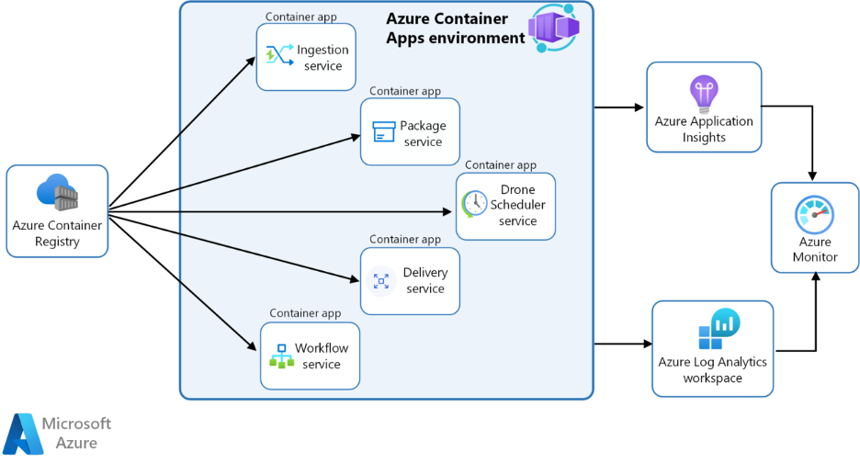
Azure Container Apps provides a fully managed serverless container platform that enables organizations to run microservices and containerized applications without managing complex infrastructure. At its core, the service builds upon Kubernetes concepts while abstracting away the operational complexity.
Source: Microsoft Learn
Environments: Secure Boundaries for Container Apps
An environment provides a secure boundary around a group of container apps, encapsulating networking, storage, and other shared resources. This ensures isolation and security between different application groups, allowing multiple environments to coexist within a single Azure Container Apps instance.
Revision Management: Seamless Application Updates
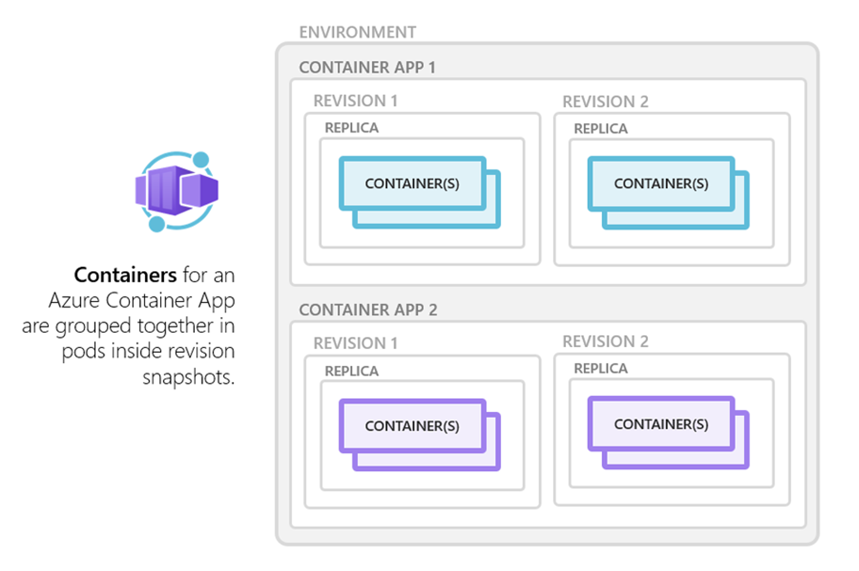
Azure Container Apps includes built-in revision management for application updates. Each time an application's code or configuration is updated, a new revision is created. This enables easy rollbacks to previous versions if issues arise, ensuring a smooth and controlled deployment process. Revisions provide a clear history of application changes over time.
Source: Microsoft Learn
Automatic Scaling: Handling Dynamic Workloads
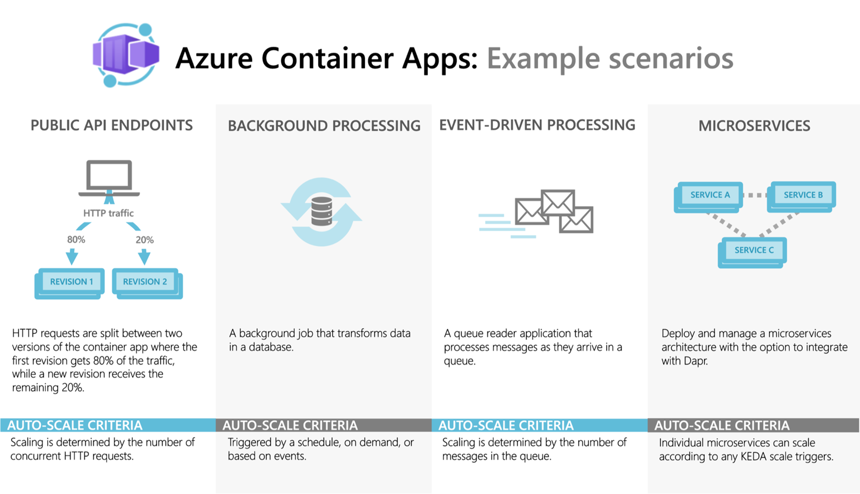
Azure Container Apps supports automatic scaling based on metrics like HTTP traffic, events, or custom metrics. Organizations can define scale rules to automatically adjust container instances based on incoming load. This ensures applications handle spikes in traffic without manual intervention.
Source: Microsoft Learn
Service Discovery: Simplifying Microservices Communication
Built-in service discovery uses internal DNS resolution. Services within the same environment communicate using their service names, eliminating hard-coded IP addresses or complex service discovery mechanisms. This simplifies microservices development and deployment.
Docker Integration and Containerization
Docker serves as the foundation for container image creation and management. The integration begins with creating optimized Docker images. Example Dockerfile for a .NET application:
FROM mcr.microsoft.com/dotnet/aspnet:6.0
WORKDIR /app
COPY bin/Release/net6.0/publish .
ENTRYPOINT ["dotnet", "YourApp.dll"]
This Dockerfile uses the official .NET 6.0 ASP.NET Core runtime image, sets the working directory to /app, copies the published files, and sets the entry point.
You may also like: Your Guide to Azure Marketplace
Flexible Container Registry Options
Azure Container Apps supports public and private container registries, allowing full control over container images. Integration with Azure Container Registry provides enterprise-grade security features and seamless deployment workflows.
Real-World Example: Migrating a Monolithic Application
Consider migrating a monolithic application on VMs to a microservices architecture using Azure Container Apps and Docker. The process involves:
Breaking the monolith into independently deployable microservices
Containerizing each microservice using Docker
Creating a CI/CD pipeline via Azure DevOps for build, test, and deployment
Leveraging automatic scaling and service discovery features
This ensures seamless communication between microservices and optimal performance.
Monitoring and Observability
Azure Monitor and Application Insights collect logs, metrics, and traces. Distributed tracing provides end-to-end visibility across services, enabling performance optimization and troubleshooting.
Conclusion
Azure Container Apps, combined with Docker, provides a powerful platform for modern enterprise deployment. Serverless architecture, automatic scaling, and CI/CD integration enable scalable, reliable, and cost-effective solutions. Migrating from monolithic to microservices architecture highlights these benefits.
Contact us today to discover how our services can help your business succeed. Learn more.
Frequently Asked Questions
Can I deploy a Docker container to Azure?
Yes, Azure Container Apps provides a fully managed platform to deploy Docker containers without managing infrastructure. It handles scaling, load balancing, and lifecycle management automatically, supporting single containers or complex microservices.
How to deploy a container in Docker?
Create a Dockerfile defining the base image, dependencies, and startup command. Build the image with docker build and run it with docker run. Push the image to a registry for deployment on platforms like Azure Container Apps.
How to deploy a microservice in Azure?
Package each microservice as a Docker container and push to a container registry. Create Container Apps for each microservice in an environment supporting:
Automatic scaling
Dapr integration for service discovery and messaging
Built-in ingress for secure public access
Secrets management and environment variables
This allows independent scaling and reliable communication without managing Kubernetes infrastructure.
What is the purpose of Azure Container Apps?
Azure Container Apps provides a serverless container platform for running microservices without managing infrastructure. Key features include automatic scaling, traffic splitting, Dapr integration, and support for multiple revisions. It simplifies deployment, scaling, and DevOps workflows for distributed applications.
Author



Let’s Start Building Together
Whether you're modernizing legacy apps, strengthening your cloud security, or planning your next big initiative, Emergent Software is here to help.


