

In This Blog
TL;DR
Azure AD Cloud Sync is Microsoft's newer directory synchronization solution that complements and extends Azure AD Connect capabilities.
Azure AD Connect traditionally provides one-way synchronization from on-premises Active Directory to Azure Active Directory.
Azure AD Cloud Sync introduces new capabilities that support more modern identity management scenarios.
Cloud Sync offers a lighter deployment model, built-in high availability, and simplified management.
Organizations can use hybrid deployments when they need features from both Azure AD Connect and Azure AD Cloud Sync.
As organizations continue their cloud migration and digital transformation initiatives, identity management becomes increasingly important.
Users need seamless access to applications, systems, and data regardless of whether resources reside on-premises, in Microsoft 365, or in Azure.
That's where directory synchronization plays a critical role.
For years, Microsoft organizations have relied on Azure AD Connect to synchronize identities between Active Directory and Azure Active Directory.
More recently, Microsoft introduced Azure AD Cloud Sync, a newer approach that offers additional flexibility, simplified deployment, and improved scalability.
In this article, we'll explore the differences between Azure AD Connect and Azure AD Cloud Sync and discuss where each solution fits into a modern identity strategy.
Why Directory Synchronization Matters
Most organizations still maintain user identities within Active Directory, even as they move workloads to the cloud.
Employees expect a consistent sign-in experience across:
Microsoft 365
Microsoft Teams
Azure resources
Business applications
Third-party SaaS platforms
Directory synchronization ensures user accounts, groups, and identity information remain consistent across environments.
Without synchronization, organizations often face:
Duplicate account management
Password inconsistencies
Increased administrative effort
Security challenges
Microsoft's synchronization tools help eliminate these issues by maintaining alignment between on-premises and cloud identity platforms.
What Does Azure AD Connect Do?
Azure AD Connect has long been Microsoft's primary solution for synchronizing identities between Active Directory and Azure Active Directory.
Originally introduced as DirSync, Azure AD Connect enables organizations to synchronize:
User accounts
Groups
Contacts
Password hashes
Selected directory attributes
Traditionally, Azure AD Connect operates as a one-way synchronization mechanism.
Organizations create and manage user accounts within Active Directory, and Azure AD Connect synchronizes those identities to Azure Active Directory.
Additional capabilities include:
Organizational Unit (OU) filtering
Password hash synchronization
Password writeback
Attribute filtering
Password Writeback remains particularly useful because it allows users to reset or change passwords through cloud-based services such as Microsoft 365 and Microsoft Teams while updating Active Directory automatically.
What Is Azure AD Cloud Sync?
Azure AD Cloud Sync is Microsoft's newer synchronization platform designed to simplify deployments and support modern identity management scenarios.
One of the most significant differences is that Cloud Sync represents a move toward more flexible identity workflows between cloud and on-premises environments.
For example, organizations can support scenarios where user accounts originate from cloud-based systems and synchronize back to on-premises environments.
This is particularly valuable when integrating modern HR systems and SaaS applications.
Instead of granting external applications direct access to Active Directory, organizations can leverage Azure AD as a secure intermediary.
A common example looks like this:
A new employee is hired.
The HR platform creates the user account.
The account is provisioned into Azure Active Directory.
Azure AD Cloud Sync synchronizes the identity to Active Directory.
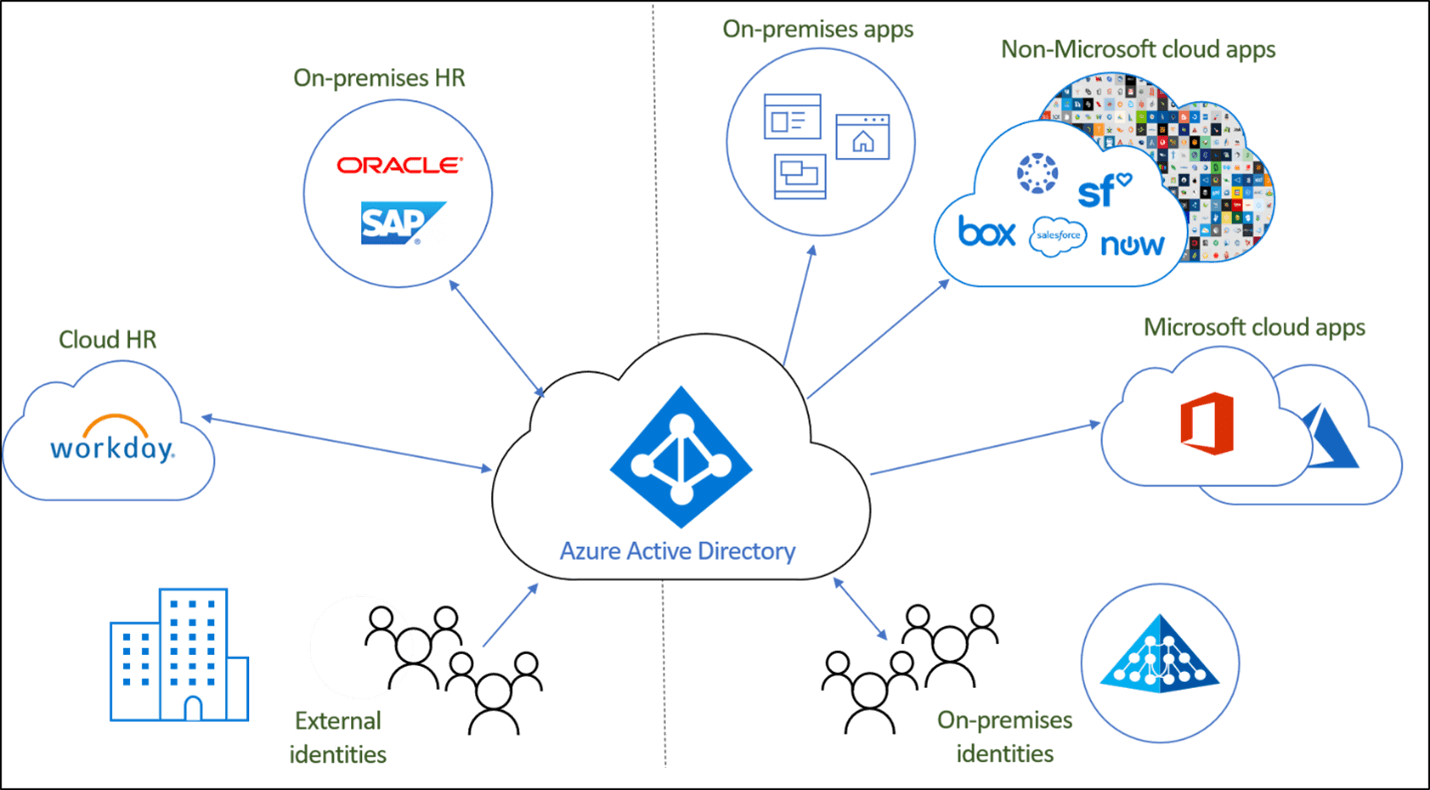
This model helps organizations modernize identity processes while maintaining security controls and existing operational workflows.
Key Benefits of Azure AD Cloud Sync
Azure AD Cloud Sync introduces several advantages compared to traditional Azure AD Connect deployments.
One of the most noticeable improvements is deployment simplicity.
Azure AD Connect requires:
A synchronization engine
SQL Express or supported SQL configuration
Additional infrastructure components
Cloud Sync significantly reduces that footprint.
Instead of deploying a full synchronization engine, administrators install a lightweight agent that runs as a service.
The agent can be installed:
Directly on a domain controller
On a server with line-of-sight access to a domain controller
Communication leverages Azure Service Bus and operates securely over TLS using outbound port 443.
No inbound firewall rules are required.
This architecture creates a simpler, more cloud-friendly deployment model.
Improved High Availability and Scalability
Another significant improvement involves high availability.
Traditional Azure AD Connect deployments generally rely on active-passive configurations that require manual failover processes.
Cloud Sync simplifies this considerably.
Organizations can deploy multiple synchronization agents simultaneously.
These agents provide built-in redundancy without requiring complex configuration or manual intervention.
If one agent becomes unavailable, another agent can automatically assume synchronization responsibilities.
Additional benefits include:
Simplified failover
Reduced operational overhead
Improved resiliency
Easier scalability
For organizations pursuing highly available cloud-first architectures, these capabilities can be extremely valuable.
When Hybrid Deployments Make Sense
Although Azure AD Cloud Sync introduces several new capabilities, not every Azure AD Connect feature is currently available within Cloud Sync.
Organizations evaluating Cloud Sync should carefully review Microsoft's documentation and feature comparison guidance before migrating.
In many environments, a hybrid deployment may be the best option.
Hybrid deployments allow organizations to:
Continue leveraging Azure AD Connect features
Adopt newer Cloud Sync capabilities
Modernize gradually
Reduce migration risk
This approach provides flexibility while allowing organizations to take advantage of Microsoft's evolving identity platform.
If you're exploring broader Azure identity modernization initiatives, read more on Azure migrations and landing zones.
How Emergent Software Can Help
Emergent Software helps organizations modernize identity management through Microsoft Entra ID, Azure Active Directory, Azure migrations, cloud architecture, security consulting, and managed services. Our team works with clients to design secure, scalable identity solutions that support both on-premises and cloud-based environments. If this sounds familiar, we can help.
Final Thoughts
Azure AD Cloud Sync represents an important step forward in Microsoft's identity management strategy.
Its lightweight architecture, built-in redundancy, and support for modern identity workflows make it an attractive option for organizations embracing cloud-first strategies.
At the same time, Azure AD Connect remains a valuable solution that continues to meet the needs of many organizations.
The right approach depends on your existing environment, business requirements, and long-term cloud strategy.
If you're evaluating Azure identity solutions or planning a migration to Microsoft Azure, reach out to our team. We'd love to help.
Frequently Asked Questions
What is Azure AD Cloud Sync?
Azure AD Cloud Sync is Microsoft's lightweight directory synchronization solution that helps synchronize identities between on-premises Active Directory and Azure Active Directory. It uses lightweight agents instead of a traditional synchronization engine and supports modern identity management scenarios. The platform is designed to simplify deployment and improve scalability. Cloud Sync also provides built-in high availability through multiple synchronization agents. It serves as part of Microsoft's broader cloud identity strategy.
What is the difference between Azure AD Connect and Azure AD Cloud Sync?
Azure AD Connect traditionally relies on a synchronization engine and SQL-based infrastructure to synchronize identities from Active Directory to Azure Active Directory. Azure AD Cloud Sync uses lightweight agents and offers a simpler deployment model. Cloud Sync also introduces support for additional identity scenarios and improved high availability. Both solutions provide identity synchronization, but their architecture and capabilities differ. Some organizations choose hybrid deployments to leverage features from both platforms.
Does Azure AD Cloud Sync replace Azure AD Connect?
Not necessarily. While Azure AD Cloud Sync introduces several advantages, some Azure AD Connect capabilities may still be required in certain environments. Microsoft supports hybrid deployment scenarios that allow organizations to use both solutions together. The appropriate choice depends on business requirements and technical needs. Organizations should review current Microsoft documentation when evaluating migration strategies. Many environments continue to successfully utilize Azure AD Connect.
What are the benefits of Azure AD Cloud Sync?
Azure AD Cloud Sync offers a lighter deployment footprint, built-in high availability, simplified management, and support for modern identity workflows. It eliminates the need for a traditional synchronization engine and SQL infrastructure. Multiple agents can provide automatic failover capabilities. The solution also uses secure outbound communication without requiring inbound firewall changes. These advantages make it attractive for cloud-first organizations.
Can Azure AD Cloud Sync synchronize passwords?
Yes. Azure AD Cloud Sync supports password synchronization capabilities that help maintain consistent credentials across environments. Organizations can leverage these features to improve the user experience while simplifying identity management. Password synchronization remains an important component of hybrid identity strategies. Specific capabilities may vary depending on deployment scenarios and Microsoft's current feature set. Always review Microsoft's latest documentation for current support details.
Who should consider Azure AD Cloud Sync?
Organizations pursuing cloud modernization, hybrid identity management, or Azure migration initiatives should evaluate Azure AD Cloud Sync. It is particularly beneficial for businesses seeking simplified deployments, built-in redundancy, and support for modern identity workflows. Companies integrating cloud-based HR systems and SaaS applications may also benefit from its capabilities. The solution fits well within broader Microsoft cloud strategies. A formal assessment can help determine whether Cloud Sync is appropriate for your environment.
Author



Let’s Start Building Together
Whether you're modernizing legacy apps, strengthening your cloud security, or planning your next big initiative, Emergent Software is here to help.


