

In This Blog
TL;DR
As we spend more time online, cyber threats such as phishing, ransomware, and account breaches continue to increase.
Using a VPN, password manager, and multi-factor authentication can significantly improve your online security.
Monitoring your accounts for breaches helps you respond quickly when personal information is exposed.
Awareness is one of the strongest defenses against phishing scams and social engineering attacks.
Simple security habits can dramatically reduce your risk both at work and at home.
Whether we're working, shopping, banking, streaming, or simply staying connected with family and friends, we're spending more time online than ever before.
According to CNN, Americans spend roughly four hours per day on their phones alone. That number doesn't even account for the time many of us spend on laptops, desktops, tablets, gaming systems, and smart TVs.
Unfortunately, increased online activity also creates more opportunities for cybercriminals.
Data breaches, phishing scams, ransomware attacks, and identity theft continue to affect individuals and organizations of every size.
The good news is that improving your online security doesn't require advanced technical skills. A few simple habits can significantly reduce your risk.
Here are six practical ways to stay safer online.
1. Use a VPN
A Virtual Private Network (VPN) creates a secure, encrypted connection between your device and the internet.
VPNs are particularly valuable when using public Wi-Fi networks, which can expose your information to attackers if proper precautions are not taken.
For remote workers, VPNs help create a secure connection back to company resources, providing protection similar to being physically connected to the office network.
Benefits of using a VPN include:
Encrypted internet traffic
Protection on public Wi-Fi
Improved privacy
Reduced risk of data interception
Many organizations also utilize cloud-based alternatives such as virtual desktops to securely provide access to company resources.
For personal use, there are numerous VPN providers available, including:
If you frequently work remotely or use public networks, a VPN is one of the simplest ways to improve your security.
2. Invest in a Password Manager
Many people reuse the same passwords across multiple websites and applications.
While convenient, password reuse creates significant security risks.
If one website suffers a breach, attackers often attempt to use those same credentials across other services.
According to research cited by Dark Reading, 91% of people understand the risks of password reuse, yet 59% admit they continue doing it anyway.
Password managers solve this problem by:
Generating strong passwords
Storing passwords securely
Reducing password reuse
Simplifying account management
At Emergent Software, we are big fans of LastPass, though there are several excellent password managers available today.
Strong, unique passwords remain one of the most effective first lines of defense against cyberattacks.
3. Monitor Your Online Presence
Even if you follow security best practices, your information may still become exposed through third-party data breaches.
That's why monitoring your online presence is important.
One excellent free resource is Have I Been Pwned.
The service, created by security expert Troy Hunt, allows users to check whether their email addresses have appeared in known data breaches.
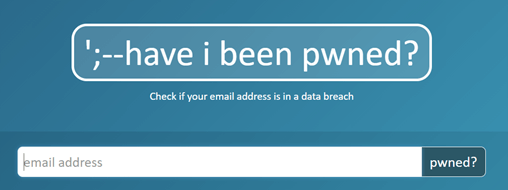
With Have I Been Pwned, you can:
Check if your email address has been compromised
Receive alerts for future breaches
Monitor domains you manage
Learn about breach-related security risks
The earlier you know about a compromised account, the faster you can take corrective action.
4. Enable Multi-Factor Authentication
Multi-factor authentication (MFA) adds an additional layer of security beyond your password.
Even if an attacker obtains your password, MFA makes it much harder for them to gain access to your accounts.
While text message verification was once the most common MFA method, many security professionals now recommend app-based authenticators because text messages are not encrypted.
Popular options include:
If you're still relying solely on passwords, enabling MFA is one of the highest-impact security improvements you can make.
For additional context, check out our article on why SMS-based authentication is falling out of favor.
5. Watch Out for Phishing and Scams
Phishing and ransomware attacks continue to increase as cybercriminals become more sophisticated.
Many attacks rely less on technology and more on tricking people into giving away sensitive information.
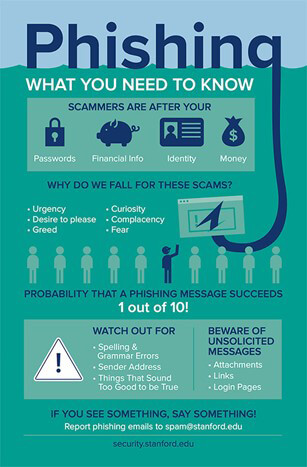
Common warning signs include:
Unexpected requests for personal information
Urgent or threatening language
Suspicious links or attachments
Requests for passwords or financial information
The Federal Trade Commission provides excellent resources for identifying and avoiding phishing scams.
You should also educate family members who may be more vulnerable to scams, including children and elderly relatives.
Awareness remains one of the strongest defenses against social engineering attacks.
If you ever receive a suspicious email, don't panic.
Instead, contact the company directly using contact information from its official website and verify whether the communication is legitimate.
When it comes to cybersecurity, a healthy dose of skepticism is often a good thing.
6. Secure Your Devices and Home Office
Physical security remains an important part of cybersecurity.
Many people focus heavily on online threats while overlooking risks associated with unattended devices.
Good habits include:
Locking your computer when away from your desk
Storing work devices securely
Keeping laptops out of sight when traveling
Securing home office equipment
Whether you're working remotely or in a traditional office environment, protecting physical access to your devices helps reduce the risk of unauthorized access.
It may seem unlikely that someone would steal a work laptop from your home, but strong security practices are about reducing risk before problems occur.
How Emergent Software Can Help
Emergent Software helps organizations strengthen security through Microsoft security solutions, cloud architecture, identity management, device management, infrastructure modernization, and managed services. Our team works with businesses to reduce risk, improve security posture, and build secure technology environments that support both productivity and compliance. If this sounds familiar, we can help.
Final Thoughts
Cybersecurity doesn't have to be complicated.
Many of the most effective security improvements come from simple habits and awareness.
Using a VPN, securing your passwords, enabling multi-factor authentication, monitoring your accounts, recognizing scams, and protecting your devices can dramatically improve your online safety.
Small actions today can prevent major problems tomorrow.
If your organization is evaluating security improvements or modern workplace solutions, reach out to our team. We'd love to learn more about your goals.
Frequently Asked Questions
What is a VPN and why should I use one?
A VPN, or Virtual Private Network, creates an encrypted connection between your device and the internet. It helps protect your data when using public Wi-Fi networks and improves online privacy. VPNs are commonly used by remote workers to securely access company resources. They can also reduce the risk of data interception by attackers. Many organizations consider VPNs a foundational security tool.
What is the safest way to manage passwords?
Using a password manager is generally considered one of the safest approaches. Password managers generate strong, unique passwords for each account and store them securely. This reduces password reuse and makes it easier to maintain strong security practices. Most modern password managers also support multi-factor authentication. Strong password management significantly reduces account compromise risk.
What is Have I Been Pwned?
Have I Been Pwned is a free online service that allows users to check whether their email addresses have appeared in known data breaches. The service also provides breach notifications and educational resources. It is widely used by both individuals and organizations. Monitoring breach exposure helps users respond quickly when credentials are compromised. Early awareness can prevent additional account compromises.
Is multi-factor authentication really necessary?
Yes. Multi-factor authentication is one of the most effective security controls available. Even if a password is compromised, MFA creates an additional verification step that attackers must bypass. This dramatically reduces the likelihood of unauthorized account access. Most major online services now support MFA. Security experts strongly recommend enabling it wherever possible.
How can I identify phishing emails?
Phishing emails often create a sense of urgency, request sensitive information, contain suspicious links, or attempt to impersonate trusted organizations. Always verify unexpected requests before responding. Avoid clicking links from unknown senders. When in doubt, contact the organization directly using information from its official website. Awareness and caution are critical defenses against phishing attacks.
What is the biggest cybersecurity mistake people make?
There isn't one single mistake, but password reuse is among the most common and damaging. Reusing passwords across multiple accounts increases the impact of data breaches. Many successful attacks also result from clicking phishing links or failing to enable multi-factor authentication. Fortunately, these risks can often be reduced through simple security habits. Consistency is one of the most important elements of good cybersecurity.
Author
Solutions



Let’s Start Building Together
Whether you're modernizing legacy apps, strengthening your cloud security, or planning your next big initiative, Emergent Software is here to help.


